The direct answer
How to prepare for an online proctored exam comes down to four jobs: read the rules, set up the room, rehearse the technology on the device and connection you will use, and practise under timed conditions. Most failures are not about knowledge. They are about a missed rule, a failed check, or a room that does not pass the scan.
A proctored exam adds a second test: whether your room, device, and connection pass the checks, and whether you follow the rules.
This system treats the setup as part of the exam. Read the rules a week before, set up the room, rehearse the technology on the exact device, and practise under timed conditions. By exam day, nothing in the process is new.
The system in short
- Read the rules in writing: what is allowed, what is banned, and how breaks and flags work.
- Set up the room and the desk: clear desk, light on your face, door closed, charger in.
- Rehearse the technology on the exact device and connection: install the software, run the system check, test the webcam and microphone.
- Study on the same device with timed practice: full mocks under exam conditions, same chair, same keyboard.
- Run the exam-day routine: log in early, pass the room scan, and pace the paper.
Step 1: Read the rules before you revise
Start a week before the exam. The rules live in your exam instructions, your student portal, or an email from your department. Find them, read them in full, and write the answers on one page. If a rule is unclear, email your department and keep the reply.
Check these points, and write down the answer to each one.
- What identification do you need, and must you hold it up to the camera?
- What materials are allowed: notes, textbook, calculator, scrap paper, water?
- Can you leave the camera view during the exam, for a break or the bathroom?
- What counts as a flag: looking away, talking, another person entering the room?
- What happens if you are flagged, and who do you contact if something goes wrong?
- How long is the exam, and how do you submit?
If your exam allows notes, use the open-book exam system for students to organise them. An open-book method applied to a closed-book proctored exam is a rule break, not a revision method.
Keep the rule sheet next to your desk, and update it the same day if the department sends a correction.
Step 2: Set up the room and the desk
Do this three or four days before the exam. The goal is a room that passes the scan first time, and a desk that holds only what the rules allow.
Clear the desk completely, then put back only the allowed items: your ID, a pen that works, scrap paper if allowed, water if allowed, and the device itself. Books, notes, a second screen, and a phone all come off the desk unless the rules allow them.
Light matters more than most students expect. Put a lamp or a window in front of you, not behind you, so the camera sees your face clearly. Sit down, open the camera, and check your whole face is visible and the desk edge is in frame.
Close the door and put a sign on it with the exam time and a request not to enter. A person walking in mid-exam can be flagged. If your household cannot be relied on to stay out, ask your institution whether you may sit the exam in a library room or another approved space.
Plug the charger in and leave it in. Check whether you may have a clock in view: most proctored exams show a timer on screen. Then do a practice room scan, and fix the background now, not on exam morning.
Step 3: Rehearse the technology on the exact device and connection
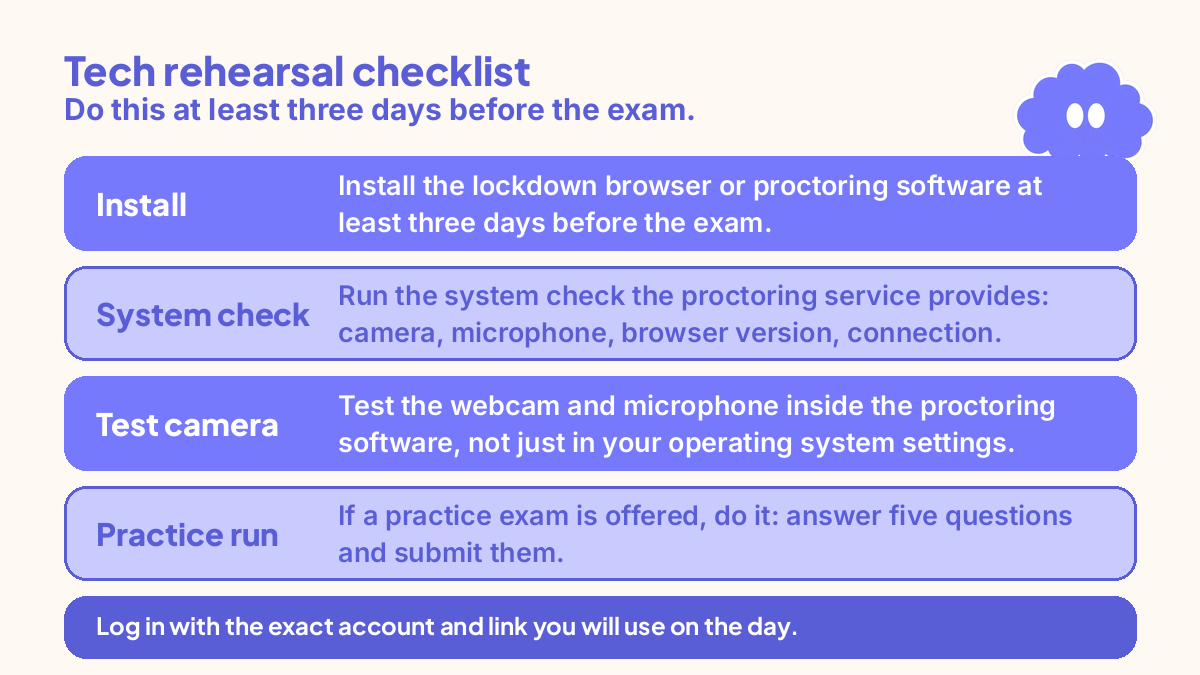
Install the lockdown browser or proctoring software at least three days before the exam. Installation can need a restart or an update, so do not leave it to exam morning. Then run the system check the proctoring service provides. It usually tests the camera, the microphone, the browser version, and the connection.
Check the minimum speed your proctoring service asks for, and run a speed test on the connection you will use, at the same time of day as the exam. If the speed is below what the service asks for, move closer to the router, use a cable if you have one, or ask your institution what to do.
Test the webcam and microphone inside the proctoring software, not just in your operating system settings. Open the software, start its test or practice exam, and check that your face is lit, your voice is picked up, and the picture is steady. If a practice exam is offered, do it: answer five questions and submit them. That single run finds most problems, including a login that does not work.
Log in with the exact account and link you will use on the day. Restart the device the night before, check for updates then, and write the support number on paper next to the desk, with your student number and exam code.
Step 4: Study on the same device with timed practice
The setup protects the grade, but revision still decides it. Practise on the same device, in the same chair, under the same conditions as the exam.
Sit at least two full mocks under exam conditions: the lockdown browser open if you can use it for practice, notes closed, phone in another room, and the timer running. Use how to use mock exams to prepare to mark every question and fix the biggest pile first. One mock is a snapshot. Two show whether the fixes worked.
Work out your pacing from the paper, not from a feeling. A 90-minute paper with 40 questions gives you about two minutes per question, with ten minutes held back at the end to check. Write the pacing on the rule sheet: half the questions done by half the time, and the check minutes protected. If your paper is mostly multiple choice, use the multiple-choice exam system for students for question tactics. Practise typing your answers if the exam is typed: handwriting speed does not transfer to a keyboard.
Test yourself from memory instead of re-reading. Dunlosky and colleagues (2013) found only practice testing and distributed practice received a high utility rating, and re-reading was rated low. Roediger and Karpicke (2006) showed recall beat restudy after a delay. Close the notes, write down what you remember for ten minutes, then check in a different colour. The gaps are the study list. For the spacing of that practice across the week, use how to revise for exams without cramming.
If the exam belongs to an online course, keep the week organised with the self-study system for online learners, and use how to finish an online course for the final push.
Step 5: Run the exam-day routine
Write the exam-day routine on the rule sheet the night before, with times. A routine you have to invent on the morning is a routine you will get wrong. Here is the shape, with times for a 10:00am exam.
Wake at your usual time and eat a normal breakfast. Restart the laptop sixty minutes before the exam, close every other program, and plug the charger in. Lay out your ID, water, and scrap paper. Log in thirty minutes early, which leaves time for the ID check, the room scan, and a slow connection.
Read the on-screen instructions in full before you start, and compare the question count, marks, and time limit with the rule sheet. Spend the first five minutes on the paper: count the questions and mark the ones that look quick. Then start, and keep to the pacing you wrote down: half the questions by half the time, and the check minutes protected. If you blank on a question, move on and come back.
If you feel panic rising, stop for thirty seconds. Put both feet on the floor, breathe out slowly three times, and read the next question again. The exam anxiety system for students covers the first five minutes in the room in full, and the same routine works on camera.
At the end, submit and wait for the confirmation screen. Note the confirmation number or message if one is given, and do not close the browser until the confirmation appears. If the exam ends or locks you out before you submit, note the time and contact your institution straight away.
A worked example: one week before a Tuesday proctored exam
Your situation: second-year psychology student. Exam on Tuesday at 10:00am, 90 minutes, 40 multiple-choice questions, lockdown browser and webcam monitoring. You revise in the evenings after lectures, and you work on Saturdays.
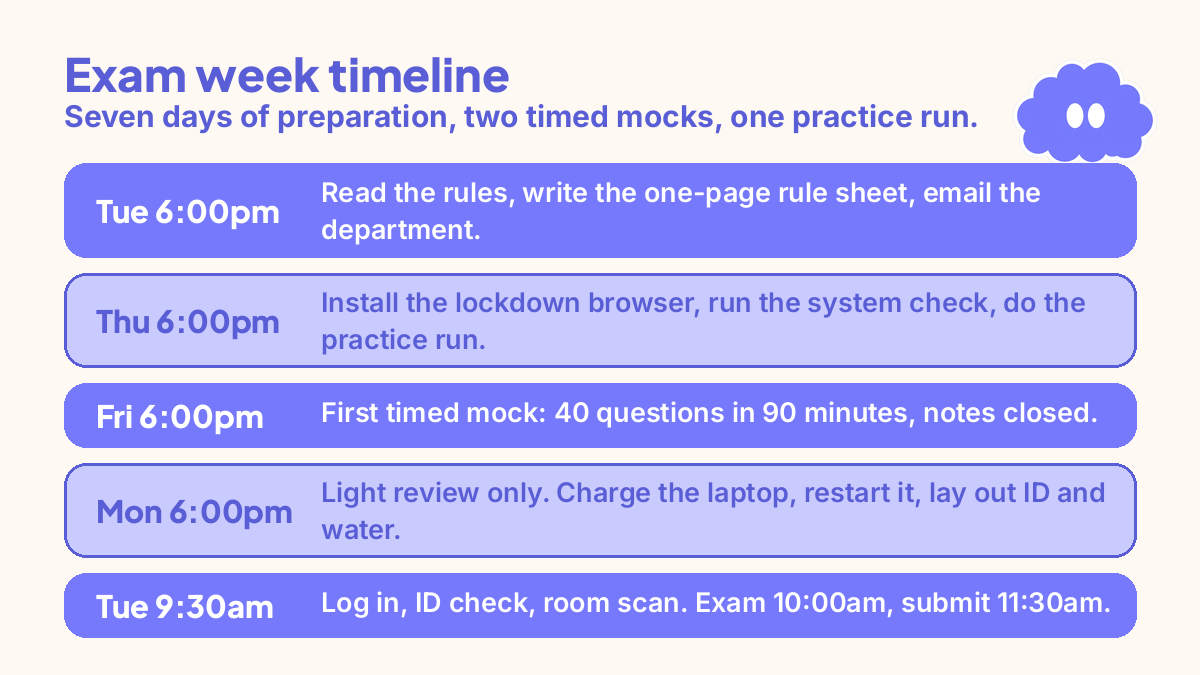
- Tuesday, 6:00-6:30pm, seven days before: read the rules, write the one-page rule sheet, and email the department about the calculator.
- Wednesday, 6:00-6:45pm: clear the desk, set up the lamp in front of you, test the camera angle, and put a sign on the door.
- Thursday, 6:00-7:00pm: install the lockdown browser, run the system check, test the webcam and microphone, and do the five-question practice run.
- Friday, 6:00-7:30pm: first timed mock, 40 questions in 90 minutes on the same laptop, notes closed, phone in another room. Mark it and list the topics to fix.
- Saturday: work, no study. In the evening, check the department reply.
- Sunday, 10:00-11:30am: fix the mock gaps with retrieval practice, in 25-minute blocks. 4:00-4:45pm: second timed mock, 20 questions in 45 minutes.
- Monday, 6:00-6:30pm: light review only, no new topics. Charge the laptop, restart it, lay out ID and water, and write the exam-day routine. In bed by 11:00pm.
- Tuesday, 8:30am: breakfast, one connection check. 9:00am: restart the laptop and close all other programs. 9:30am: log in, ID check, room scan. 10:00am: exam starts. 11:30am: submit, wait for confirmation, and close the laptop.
That is seven days of preparation, two timed mocks, and one practice run, with nothing left to discover on exam morning.
When it goes wrong
The system check fails the day before. Read the error message in full and fix the named item first, which is usually the browser version, the camera permission, or an update. If it still fails, contact your institution the same day, with a screenshot of the error.
The lockdown browser will not open. Restart the device, close every other program, and try again. If it still will not open, use the support number on your paper sheet.
Your Wi-Fi drops mid-exam. Stay calm and do not close the exam window. Wait for the connection to return, and follow the instructions your proctoring service gave you before the exam. If the exam ends or locks you out, note the time and contact your institution straight away.
You get flagged for looking away. Keep going. Most flags are reviewed by a person later, and a flag is not a fail. Note the time and what you were doing, so you can explain it if asked.
The room scan fails. Fix the one thing the system names: a poster, a book on the shelf, a second screen. Remove it or cover it, and run the scan again. If it keeps failing, contact support with the number on your sheet.
You panic in the first ten minutes. Stop for thirty seconds, breathe out slowly three times, and answer the easiest question on the paper first.
Weekly review checklist
Use this checklist at the end of the exam week, in writing, in 15 minutes.
- Did the room pass the scan first time, and what needed fixing?
- Did the tech rehearsal find any problem, and was it fixed before exam day?
- Did your pacing hold: half the questions by half the time, with check minutes left?
- Which topics did the mocks find weak, and did the fixes work?
- What rule did you almost miss, and is it on the rule sheet now?
- What one part of the setup will you change for the next proctored exam?
Downloadable infographic spec: one vertical image, title “Prepare for a proctored exam”, with the five steps from “The system in short” and the six review questions above, in Thynq cream, Cloud Purple, Dark Purple and pink, with the Cloud mascot. Text taken word-for-word from this article.
What this system is not
This system does not teach you the subject. It protects the exam so your revision can show, and it cannot make up for a week with no study. It is not a guarantee against flags or technical failures, because no preparation can promise that.
It is not a general exam system either. A written exam in a hall needs a different routine: travel, timing, and paper skills. Use this system for online proctored exams only, and a revision system for the subject itself.
Sources
- Dunlosky, J., et al. (2013). Improving students’ learning with effective learning techniques. Psychological Science in the Public Interest, 14(1), 4-58. Only practice testing and distributed practice rated high utility; rereading and highlighting rated low.
- Roediger, H. L., & Karpicke, J. D. (2006). Test-enhanced learning. Psychological Science, 17(3), 249-255. Retrieval practice beat restudying after a delay.
For the full system behind this method, start with how to build a study system that fits your life.
Questions
What is an online proctored exam?
An online proctored exam is an exam you sit at home or in another approved place while software or a person checks that you follow the rules. A lockdown browser may stop you opening other programs, and a webcam may record you and your room. The exact setup depends on your institution, so read its instructions before you do anything else.
How far in advance should I prepare for a proctored exam?
Start a week before the exam. That gives you time to read the rules, set up the room, and run a full tech rehearsal on the exact device and connection you will use. If the rehearsal finds a problem, you still have days to fix it or ask for help, instead of minutes on exam morning.
What should I do if my Wi-Fi drops during a proctored exam?
Stay calm and follow the instructions your proctoring service gave you before the exam, which usually means waiting for the connection to return and not closing the exam window. If the exam ends or locks you out, note the time and contact your institution straight away. Do not try to restart the exam on your own without instructions.
Can I have notes or water during a proctored exam?
Only if your institution says so. Some proctored exams allow a clear water bottle or one page of notes, and some allow nothing on the desk at all. Check the rules in writing before exam day, and set the desk up exactly as the rules describe. Never guess, because an unapproved item can be flagged.