The direct answer
How to organise your thesis research data is a setup job, not a tidying job: build one folder structure, use one file-naming rule, save versions instead of overwriting, keep three copies with one off-site, and write a README that explains the whole system.
Research data is where theses most often slip. Not because the analysis is wrong, but because the files are a mess: a student loses an afternoon looking for the right version of a spreadsheet, finds two files both called final, or discovers the only copy of the interview notes was on a laptop that stopped working.
This system takes one afternoon to set up and 15 minutes a week to maintain, and it works with the folders and cloud storage your university already provides.
The system in short
- Set up one home folder with five subfolders: raw data, cleaned data, analysis, outputs, and notes.
- Use one file-naming rule for every file: date, chapter, content, version.
- Save versions instead of overwriting, and keep a simple version log.
- Run the 3-2-1 backup routine: three copies, two media types, one off-site.
- Write a one-page README that explains the folders, the naming, and the backups.
- Tidy for 15 minutes every week, and check the backup before every supervisor meeting.
Step 1: Set up one home folder with five subfolders
Give your data one home: one folder on your laptop, named with your thesis topic. Everything to do with your research data lives inside it, and nothing else does. Drafts belong in a separate folder, and PDFs of papers belong in your reference system.
Inside the home folder, make five subfolders and use the same five for every chapter. Raw data holds the data exactly as you collected it: interview recordings, survey exports, lab readings, field notes. Never edit a file in raw data. Cleaned data holds the versions you actually work with. Analysis holds your scripts and workings. Outputs holds the tables, figures, and results for the thesis. Notes holds your decisions.
Use the same five folders for each chapter by adding a chapter folder above them. A reader who finds one chapter can find the rest, because the shape never changes.
Do this in one sitting, in about an hour, before you collect any more data. If you already have data scattered across your laptop, spend the hour moving it into the new structure first. Label the folders with plain words, not codes.
Step 2: Use one file-naming rule for every file
A file name should tell you what the file is without opening it. Use one pattern for every file: date, chapter or project, what the file is, and the version number, separated by hyphens, with no spaces and all lower case.
For example: 2026-11-15-interviews-cleaned-v02.csv. The date, chapter, content, and version number each tell you one thing about the file. A file called “final version 3 (2).csv” tells you none of that.
Put the date first, in year-month-day order, so the files sort themselves when you list them. Dates written day first do not sort.
Keep file names short: four parts, no more. If a file needs a longer description, put it in the README, not in the file name. Rename the files you already have to the new pattern, in one 30-minute session, starting with the ones you open most. Do not rename a file while a program has it open.
Step 3: Save versions instead of overwriting
Never overwrite a file that works. When you change a dataset, save the new version with the next version number, and keep the old one. The old version is your way back when the new version has a mistake.
Use version numbers in the file name: v01, v02, v03. Go up by one each time you save a change. Do not use words like final, final2, or really final, because they are not versions and they do not sort.
Keep a version log in the notes folder, one line per version, and update it when you save. Each line says the date, the file, what changed, and why. For example: “2026-11-15, interviews-cleaned-v02, removed two duplicate rows.” Six months later, that line is the only record of why the data changed.
If your university provides version control, use it for your analysis scripts, because it records every change automatically. The naming rule and the version log cover the data files. If you have never used version control, ask your department or library for a 30-minute introduction before you start. The system for planning a long research project covers how to fit setup work like this into your phases.
Step 4: Run the 3-2-1 backup routine
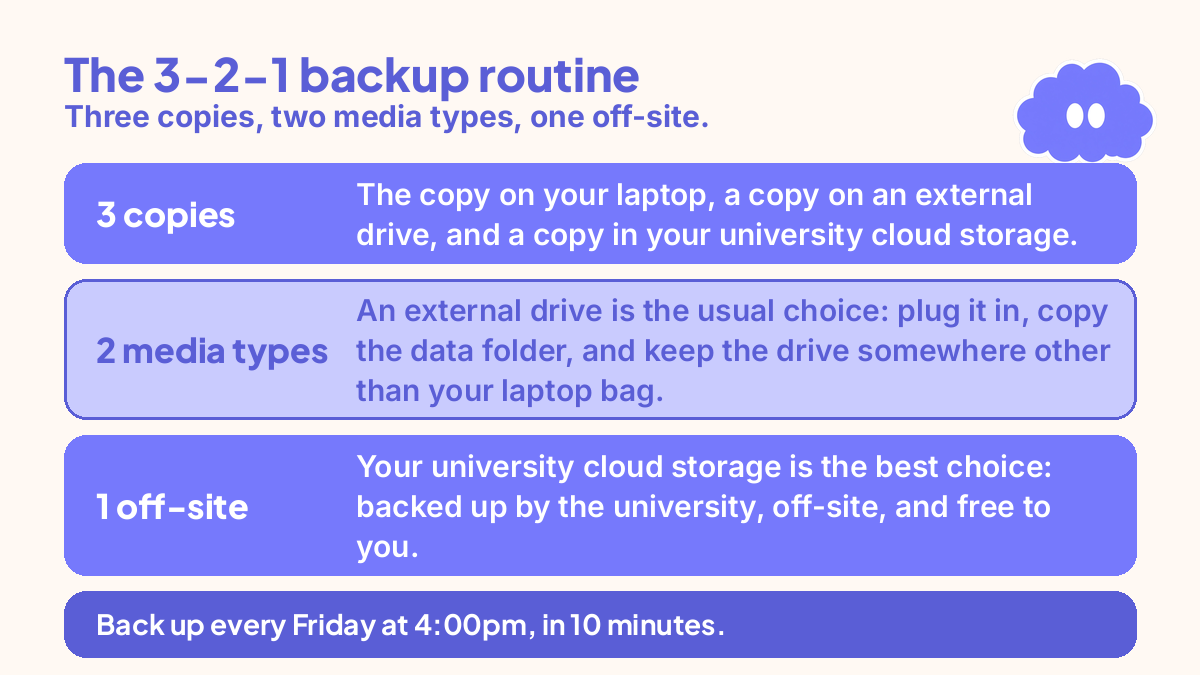
The 3-2-1 backup rule is simple: keep three copies of your data, on two different types of media, with one copy off-site. For a thesis, that usually means the copy on your laptop, a copy on an external drive, and a copy in your university cloud storage.
Set the routine up in 30 minutes. First, choose your off-site copy. Your university cloud storage is the best choice: backed up by the university, off-site, and free to you. Check that your data folder fits inside your account space.
Second, choose your second media type. An external drive is the usual choice: plug it in, copy the data folder, and keep the drive somewhere other than your laptop bag. A USB stick is not a backup: it is small, easy to lose, and fails without warning.
Third, set the routine: back up every Friday at 4:00pm, in 10 minutes. Copy the whole data folder to the external drive, then to the cloud storage. Do not back up only the files that changed, because a partial backup is easy to get wrong. Then open one file from the cloud copy to check it worked: a backup you never test is only a hope. If you collect data in the field, back up the same day, and carry the drive separately from the laptop, so one lost bag does not take both copies.
Step 5: Write a one-page README that explains the system
A README is a one-page note in the home folder that explains the whole system to someone who has never seen it. Write it so a stranger, or you in six months, can find and use the data without asking anyone. It takes 30 minutes to write, and it saves hours at the end.
The README needs six things: what the folder holds, how the folders are organised, how files are named, with one example, where the raw data came from, what each version changed, and where the backups live.
Write it in plain language, with no abbreviations that only you understand. “Interviews, 12 participants, recorded October 2026, transcribed November 2026” is useful. “INTs, Oct, done” is not.
Update the README whenever the system changes: a new dataset, a new folder, a new backup location. The update takes two minutes if you do it at the time, and an hour if you do it at the end. Put a “last updated” date at the top. The README also feeds your methodology chapter: when you write the thesis methodology, it gives you the facts.
Step 6: Tidy for 15 minutes every week
A data system fails slowly: files drift out of their folders, a version gets saved without a number, a backup gets skipped for three weeks. The weekly tidy stops the drift before it becomes a mess.
Pick one time and keep it: Friday at 4:00pm or Monday at 9:00am. Set a timer for 15 minutes: move stray files into the right subfolder, rename any file that breaks the naming rule, update the version log, and update the README if anything changed.
Before every supervisor meeting, run the tidy and the backup, then check the README is up to date. A tidy data folder lets you answer where a result came from in a minute. The thesis weekly review system covers how to use that meeting well. If you fall behind for two weeks, run the 15-minute tidy twice in one week instead of one long catch-up session.
A worked example: one thesis data folder for a mixed-methods thesis
Your situation: masters student, mixed-methods thesis on study habits, 12 interviews and one survey of 80 students. Data collection runs October to December, writing runs January to March. You have interview recordings on your phone, survey exports in your email, and a spreadsheet called “data final (2).xlsx” on your desktop.
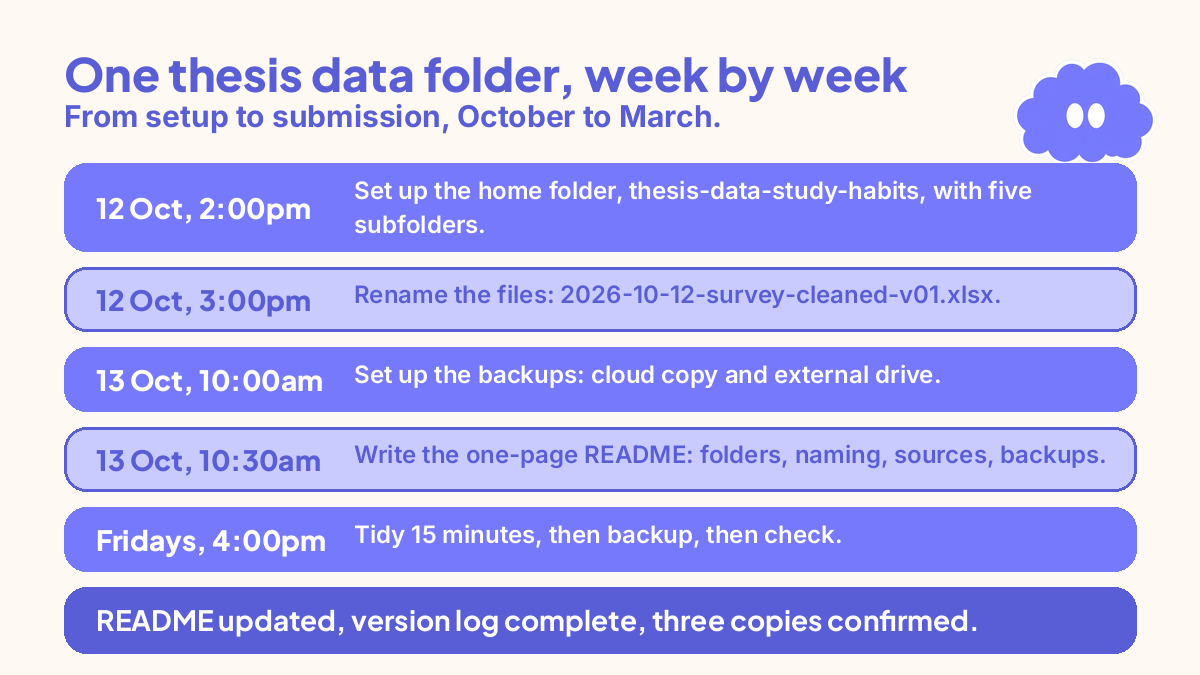
- Monday 12 October, 2:00-3:00pm: set up the home folder, thesis-data-study-habits, with the five subfolders inside. Move the recordings and survey exports into raw data, and the desktop spreadsheet into cleaned data.
- Monday 12 October, 3:00-3:30pm: rename the files. The spreadsheet becomes 2026-10-12-survey-cleaned-v01.xlsx, the recordings become 2026-10-12-interview-01-raw.mp3 through interview-12, and write the first version log lines.
- Tuesday 13 October, 10:00-10:30am: set up the backups. Copy the folder to the university cloud storage and to an external drive, open one file from the cloud copy to check it worked, and write the backup locations in the README.
- Tuesday 13 October, 10:30-11:00am: write the one-page README: what the folder holds, the naming rule with one example, the data sources, and the backup routine.
- Friday 16 October, 4:00-4:15pm: first weekly tidy. Move two stray transcripts into cleaned data, rename one file that missed the version number, update the version log, and run the backup.
- Every Friday, 4:00-4:15pm, October to March: tidy, then backup, then check. Before each supervisor meeting, run the tidy a day early.
- Monday 9 March, 9:00-9:30am: final check before submission. README updated, version log complete, three copies confirmed, one file opened from each copy.
That is one afternoon of setup and 15 minutes a week. The same system works for a lab thesis or a single-method thesis: change the file types, keep the rest.
When it goes wrong
You have two files both called final. Open both, check the dates and the contents, and rename the real one with the next version number. Delete the other one only after you have checked it, and note it in the version log.
You lost a file. Check the three backup copies in order: the external drive, then the cloud storage, then the laptop. Restore the most recent copy and rename it with the next version number. If no copy exists, tell your supervisor the same day, and rebuild what you can from your notes.
Your versions are mixed up. List the files by date, open the most recent three, and work out which one is the latest good copy by checking the contents against your notes. Rename it with the next version number.
You skipped the backup for a month. Run the backup now, and check one file from the cloud copy. Then put the Friday 4:00pm backup in your calendar as a repeating event. One skipped month is recoverable. Three skipped months, ending with a lost laptop, is not.
You are behind on your thesis and the data feels like a distraction. The data folder is not a distraction, it is the thing that lets you finish. If you are behind, use the system for finishing a thesis when you are behind to cut the scope first, then tidy the data folder in one 15-minute session. If you feel stuck, the system for getting unstuck on a thesis covers the next small step.
Weekly review checklist
Use this checklist every Friday at 4:00pm, in writing.
- Is every new file in the right subfolder, with the right name and version number?
- Is the version log up to date, with one line per change this week?
- Did the backup run, and did you open one file from the cloud copy to check it?
- Does the README still match the folders, or has something changed?
- What one file or folder needs renaming, moving, or deleting next week?
- Can you find the file your supervisor is most likely to ask about, in under a minute?
Downloadable infographic spec: one vertical image, title “How to organise your thesis research data”, with the six steps from “The system in short” and the six review questions above, in Thynq cream, Cloud Purple, Dark Purple and pink, with the Cloud mascot. Text taken word-for-word from this article.
What this system is not
This system does not analyse your data, and it does not choose your method. It organises the files so the analysis can happen without losing work. It does not promise grades, and it does not replace your university’s research data policy: if your department or funder requires a data management plan, a specific repository, or a retention period, follow those rules, and use this system inside them.
It is not a literature search system or a reference system. Searching for papers and organising data are different jobs. If you have already lost data, this system will not bring it back, but it will stop the next loss. Start with the backup step first, today.
Sources
This system is built from the Thynq house method and the linked Thynq articles on references, project planning, methodology, and supervisor meetings. No verified research source in the available list fits this topic, so no research citation is claimed here. The 3-2-1 backup routine is a standard backup practice stated as a rule of the system, not as a research finding.
Questions
How should I organise my thesis research data?
Give it one home folder with the same structure for every chapter: raw data, cleaned data, analysis, outputs, and notes. Use one file-naming rule for everything, keep a README that explains the structure, and back up on the 3-2-1 routine. Set it up once, in an afternoon, and tidy it for 15 minutes a week.
What is the 3-2-1 backup rule for research data?
Keep three copies of your data, on two different types of media, with one copy off-site. For a thesis, that usually means the copy on your laptop, a copy on an external drive or a second device, and a copy in your university cloud storage. Check the off-site copy once a week, because a backup you never test is only a hope.
How do I name research data files for a thesis?
Use one pattern for every file: date, project or chapter, what the file is, and a version number, with no spaces. For example, 2026-11-15-interviews-cleaned-v02.csv. The date sorts the files, the version number stops you overwriting the last good copy, and the pattern means you can find any file without opening it.
What should a thesis data README contain?
It should say what the folder holds, how the folders are organised, how files are named, where the raw data came from, what each version changed, and where the backups live. One page is enough. Write it so a stranger, or you in six months, can find and use the data without asking anyone.