
The direct answer
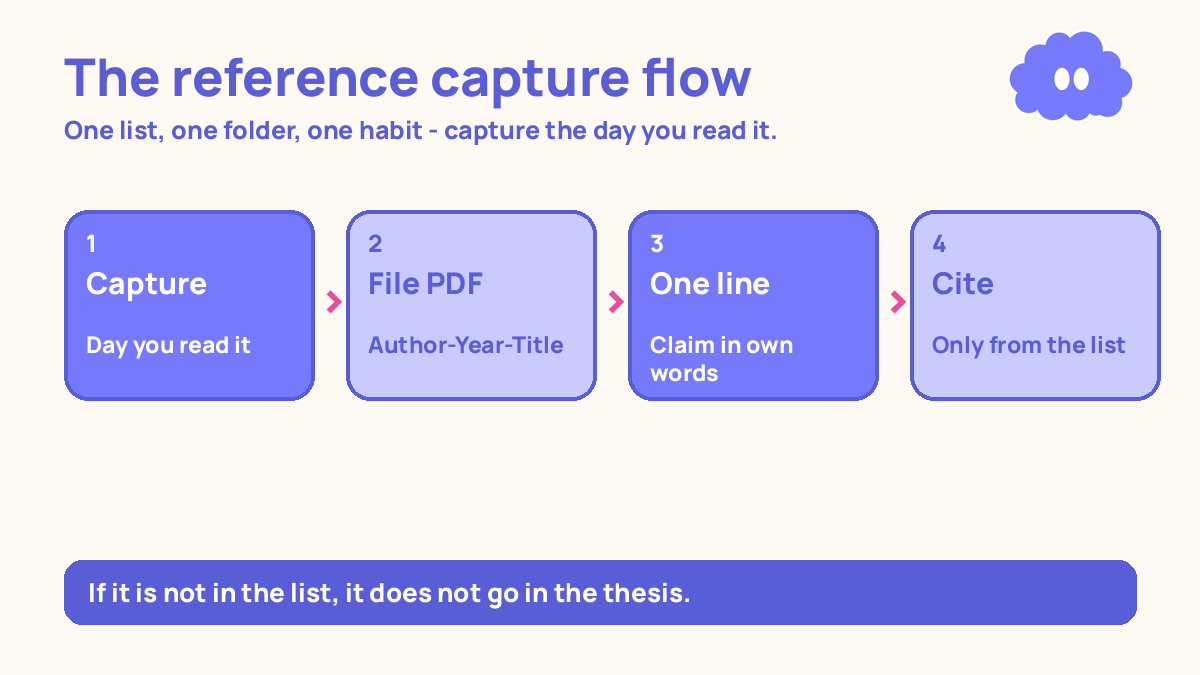
Manage your references with one list, one file per paper, and one habit: capture a paper the moment you read it, file the PDF under the author’s name and year, and cite only from that list. Do that from the first paper, and your reference list builds itself while you write.
You have probably felt the other version of this already. You read a paper, liked one sentence, and told yourself you would remember where it came from. Weeks later you need that sentence, and all you have is a half-remembered author name and a PDF called download (14).pdf. That is not a memory problem. It is a system problem.
A thesis is long enough that no one can hold its sources in their head. Your job is to build a place where every paper is easy to find again, and to use that place every single time.
The system in short
- Pick one home for references: a reference manager app or one spreadsheet. Never two.
- Capture every paper the day you read it, with author, year, title, and where you found it.
- Save the PDF in one folder, named
Author-Year-Short-Title.pdf. - Write one line per paper saying what it claims, in your own words.
- Cite only from your list. If it is not in the list, it does not go in the thesis.
- Back up the whole folder every Friday, in two places.
- Check the list against the text once a week, so the two never drift apart.
Step 1: Pick one home and stop shopping
You need one list. It can be a reference manager or a spreadsheet, and either works if you commit to it. A reference manager builds your bibliography for you, which saves real time when you have a hundred sources. A spreadsheet works if your thesis is small and you are happy formatting the list by hand at the end.
What does not work is two lists, or a list plus a pile of loose PDFs. Pick the one you will actually open. If you already use a spreadsheet for everything else, use a spreadsheet. If your department uses a particular reference manager, use that one.
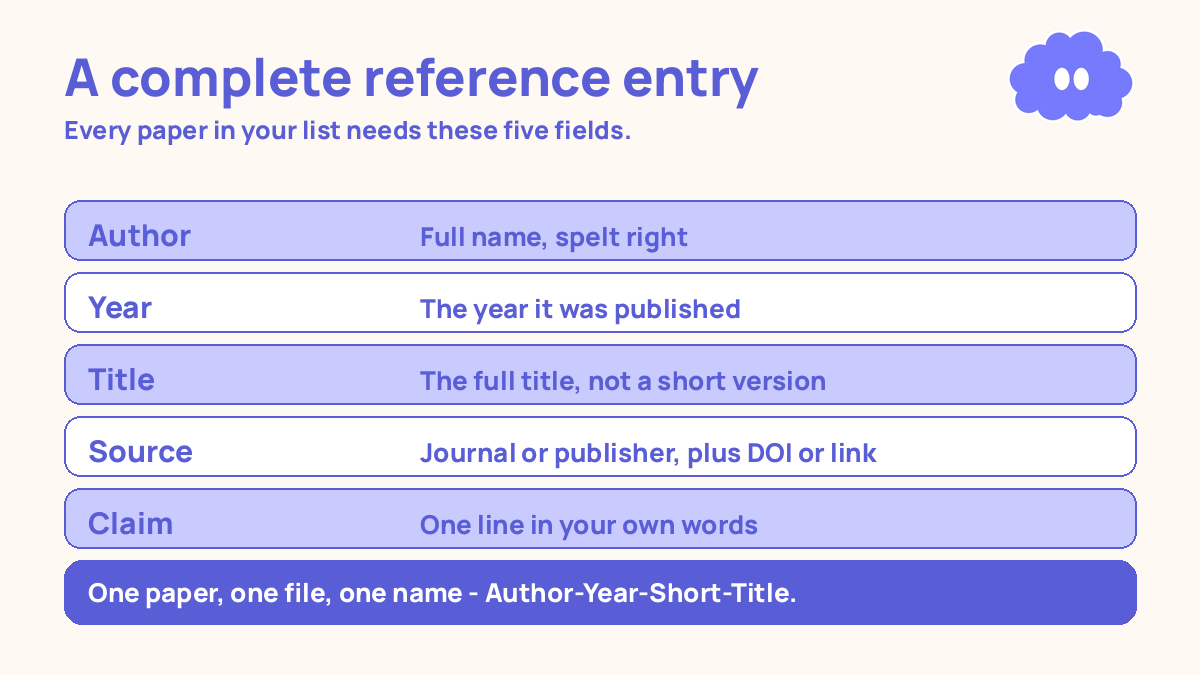
Set it up once: author, year, title, journal or publisher, DOI or link, and a notes field. That is the whole setup. Do not spend a week comparing tools.
Step 2: Capture the paper the day you read it
The rule is simple: a paper enters your list the day you read it, not later. Later never comes, and when it does, you have forgotten the details that matter — which chapter it belongs to and why it mattered.
Capturing takes three minutes. Add the author, year, and title. Add the DOI or the link where you found it. Save the PDF. Then write one sentence in the notes field: what this paper claims, in your own words.
That one sentence is the most valuable field in your whole system. Months from now, when you are writing your literature review, you will not re-read fifty papers. You will read fifty one-line summaries and know which three to open again. If you are writing the review chapter, the literature review system shows how those one-line summaries turn into paragraphs.
Decide the cue and the action in advance, so capturing does not need a fresh decision each time: “When I finish reading a paper, I will add it to my list before I open anything else.” Research on if-then plans (Gollwitzer & Sheeran, 2006) found that naming the cue and the action in advance raised goal attainment by a medium-to-large amount (d = 0.65) across 94 studies. The plan just removes the decision, and the decision is where the habit usually dies.
Step 3: Name every file the same way
Your PDF folder is the second half of the system, and it needs the same discipline as the list. Every file gets the same name format: Author-Year-Short-Title.pdf. So a paper by Smith from 2021 about spaced practice becomes Smith-2021-Spaced-Practice.pdf.
Do not keep the name the publisher gave it — publisher names are random strings and download numbers. Do not keep two copies of the same paper. One paper, one file, one name.
Inside the folder, do not build a maze of subfolders by topic. Topics change as your thesis changes, and a paper that belonged to chapter two in March belongs to chapter four in June. Keep one flat folder and let your list do the organising — it can tag a paper with a chapter or a theme without moving the file.
Step 4: Write what each paper claims, not what it says
A reference list tells you a paper exists. A notes field tells you why it matters. The research reading system covers how to read a paper so you leave with its claim and its method, not just a highlighted PDF.
For each paper, write one line: the claim, in your own words, plus one line on how the authors showed it. “Spacing beats massing for long-term retention, shown in a review of hundreds of experiments.” That is enough. You do not need a summary of the whole paper. You need the sentence you will actually use when you write.
Test yourself on the claim a week later, from memory, before you open the paper again. In a 2013 review, Dunlosky and colleagues rated ten common study techniques, and only practice testing and distributed practice received a high utility rating. Rereading was rated low. If you can state a paper’s claim without looking, you understand it well enough to cite it.
Step 5: Cite only from the list
This is the rule that prevents the submission-week disaster. If a paper is not in your list, it does not go in your thesis. No exceptions, no “I will add it later”. If you want to cite it, add it first — with its PDF and its one-line claim — and then cite it.
The reason is simple. A citation you added from memory is a citation you will have to verify later, and verification is slow when you are tired and the deadline is close. A citation from the list is already verified, because the list holds the author, the year, and the source.
When you cite, use the reference manager’s cite feature or copy the details from your list by hand — but always from the list. Never type a citation from memory. Memory gets years wrong, spells names wrong, and invents volume numbers. Your list does not, as long as you entered the details once, carefully.
If you need a quick reference without opening your manager, the free citation generator formats what you type in APA 7, MLA 9 or Harvard, gives you the in-text citation beside it, and exports .bib and .ris files you can import into your main list. Check each one against the source before you submit.
Step 6: Back up every Friday
A thesis reference list is weeks of work in one file. Losing it means rebuilding your whole literature review. Back it up every Friday, in two places: one copy on your computer, one somewhere else — a cloud drive, a USB stick, an email to yourself. The backup takes two minutes. Check that the PDFs are in the backup too.
Step 7: Check the list against the text every week
Once a week, spend fifteen minutes checking that your text and your list agree. Read through the citations in the section you wrote that week. Is every cited paper in the list? Is every paper in the list cited somewhere, or is it sitting there unused? Are the years right? This check fits inside the wider weekly rhythm of the thesis writing system that keeps moving.
A worked example: one week of capturing
Here is what the system looks like in a normal week, in the middle of your literature review, reading three or four papers a week.
Monday, 9:00–10:30: You read two papers for the review chapter. As you finish each one, you add it to the list: author, year, title, DOI. You save the PDFs as Chen-2023-Feedback-Timing.pdf and Okafor-2022-Retrieval-Classroom.pdf, and write one line each: Chen found feedback given quickly helped more than delayed feedback; Okafor found classroom retrieval practice beat restudy after a delay. Three minutes per paper, done before you move on.
Wednesday, 9:00–10:00: You read one more paper and capture it the same way. You also open a paper from last month to check a claim: the one-line note gives it to you in five seconds, so you cite it instead of re-reading twelve pages.
Friday, 4:00–4:30: Weekly check. You read the citations in the two pages you wrote this week. All three new papers are in the list and cited. One older paper is not cited anywhere yet — you tag it “maybe cut”. Then you back up the folder to the cloud drive. Total admin for the week: about thirty minutes, spread across three days.
When it goes wrong
You have fifty papers and no list yet. Do not try to fix it in one sitting. Start from today: every new paper goes in the list, no exceptions. Then add the old papers in batches of five, oldest first, for twenty minutes a day. In two weeks the backlog is gone.
You keep finding the same paper twice. You saved it under two names. Search your folder by author before saving anything new, and if you find a duplicate, delete one copy and keep the cleanest name.
Your reference list and your text disagree. A citation in the text has no matching entry, or an entry has no citation. Fix it now, not at the end. If you cannot find the paper a citation points to, remove the citation and the claim that depended on it until you can check the source.
You switched tools halfway through. You moved from a spreadsheet to an app, or the other way, and half your papers are in each. Stop, pick one, and move everything into it in one session. It is a dull afternoon, but it is one afternoon. Two half-lists will cost you far more.
Weekly review checklist
Copy this list and use it each week:
- Did I capture every paper I read this week, with author, year, title, and DOI or link?
- Does every new paper have a PDF saved as
Author-Year-Short-Title.pdfin the one folder? - Does every new paper have a one-line claim in my own words?
- Did I cite only from the list this week — no citations typed from memory?
- Does every citation in this week’s writing match an entry in the list?
- Did I back up the list and the PDFs in two places on Friday?
- What one change will I make next week: capture faster, clean up duplicates, or clear the backlog?
Downloadable infographic spec: one vertical image, title “Capture it once, find it always”, with the seven steps — one home, capture the day you read it, one file name, one line per paper, cite only from the list, back up Fridays, weekly check — in Thynq cream, Cloud Purple, Dark Purple and pink, with the cloud mascot. Text taken word-for-word from this article.
What this system is not
It is not a promise that your thesis will be accepted, and it is not a claim that one tool is better than another. It is a practical routine for keeping track of sources so that writing is the hard part, not finding things. If your department requires a particular citation style, follow it. The system survives either choice, because the system is one list, one folder, and one habit — not a product.
Sources
- Gollwitzer, P. M. & Sheeran, P. (2006). Implementation intentions and goal achievement: a meta-analysis of effects and processes. Advances in Experimental Social Psychology, 38, 69–119. If-then plans raised goal attainment by a medium-to-large amount (d = 0.65) across 94 studies.
- Dunlosky, J., et al. (2013). Improving students’ learning with effective learning techniques. Psychological Science in the Public Interest, 14(1), 4–58. Only practice testing and distributed practice received a high utility rating; rereading was rated low.
For the wider system this routine sits inside, see the thesis writing system that keeps moving.
Questions
When should I start managing references?
On the day you read your first paper. A reference captured late is a reference you have to hunt for. Start with the system above even if you only have three papers.
Do I need a reference manager app?
You need one place where every reference lives: an app or a single spreadsheet. An app saves time when you cite, because it builds the list for you. A spreadsheet works if you keep it as the only list.
What do I do when I cannot find a reference I cited?
Stop and find it before you write another word. Search by the author’s name and a phrase from the paper. If you still cannot find it, remove the citation and the claim that depended on it.
How many references does a thesis need?
There is no number that is right for every thesis. What matters is that every claim that needs support has one, and every reference in your list is cited in the text. Ask your supervisor what a normal range looks like in your field.