The direct answer
Use AI to build a revision timetable: give a free AI chat app your exam dates, your weak topics in order of marks at risk, and your honest free hours per day, and ask it to draft a timetable that tests each topic on day 1, day 3 and day 7, with the last week left for re-testing only. Then check the draft against your real week and fix it before you follow it.
You have exams coming, you know which topics are weak, and you know — honestly — that your free hours are fewer than you wish they were. That is the whole situation this article is for. Not a student with six free hours a day and a quiet house. A student with two or three real hours on a good day, some of them tired hours, and a list of topics that will not all fit.
The temptation is to sit down and build the perfect timetable by hand, with coloured blocks and every hour accounted for. That usually takes an evening, and the timetable falls apart on the first day a shift runs late or a family duty appears. The other temptation is to ask an AI app to make the whole plan and then follow it blindly. That falls apart just as fast, because the AI does not know your week.
So the system is neither. You give the AI the facts it needs, it does the sorting and spacing in seconds, and you do the one job it cannot do: checking the draft against your real life.
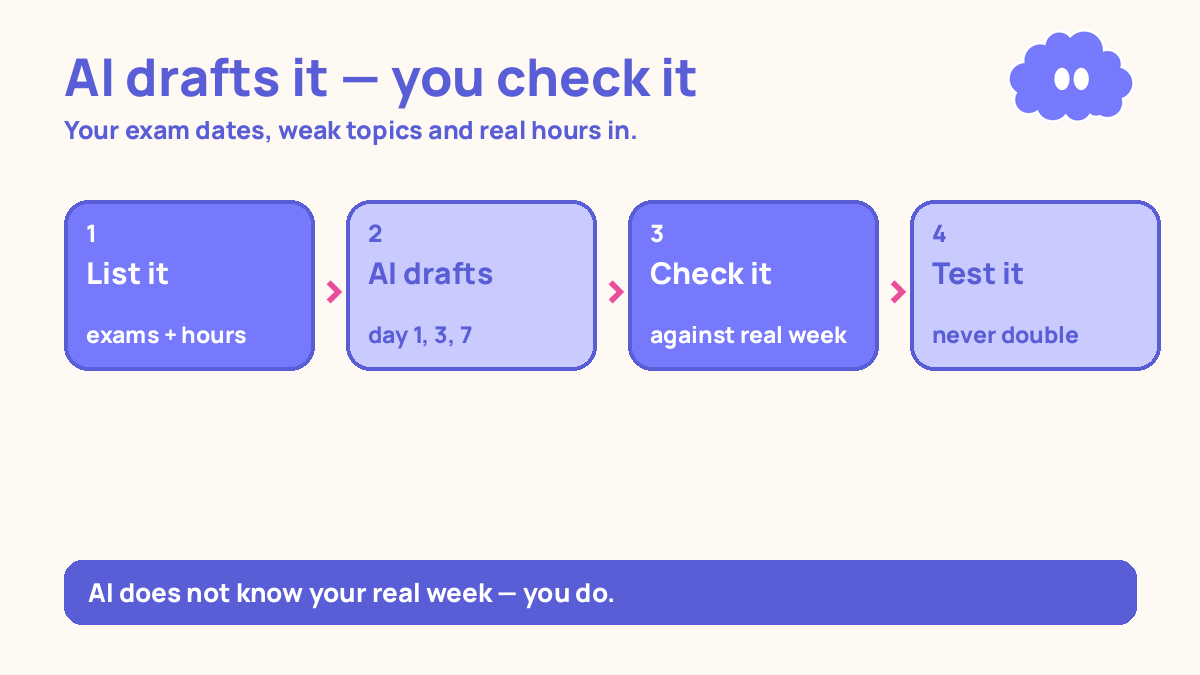
The system in short
- List your exam dates, your weak topics in order of marks at risk, and your honest free hours per day.
- Ask the AI to draft a timetable that tests each topic on day 1, day 3 and day 7, with the last week for re-testing only.
- Check the draft against your real week — shifts, family duties, energy — and fix the hours and move the sessions that clash.
- If you changed a lot, re-ask the AI for a revised draft, then check it again.
- Follow the timetable by testing yourself, not re-reading, and move it when a day is missed instead of doubling up.
Step 1: List your exam dates, your weak topics, and your honest free hours
Do not open the AI app yet. An AI timetable is only as good as the inputs you give it, and the most common way this goes wrong is feeding it a wish list instead of a fact list. “I have four free hours a day” is a wish if you really have two. The timetable it builds from that wish will fail on day one, and you will blame the timetable instead of the input.
Start with the exam dates. Write down each exam and its date, and how many days you actually have before the first one. Count backwards from the exam, not forwards from today — the deadline is the fixed point.
Next, list your weak topics. Not every topic in the subject, just the weak ones, in order of marks at risk. The topic that could cost you the most marks goes first. How do you know the order? Use your last test or mock paper. The topics you lost the most marks on go at the top. If you have no paper to work from, test yourself on the topic list, notes closed, and rank the topics by how few questions you could answer. The list does not have to be perfect. It has to be honest, and in order.
Then the part most students lie about, to themselves more than to anyone else: your free hours. Write down, for each day of the week, how many hours you can actually study. Not the hours between school and bedtime — the hours after the things that will really happen. Your shift. Family duties. Cooking, cleaning, looking after someone. The hour after dinner when you are too tired to think straight is not a study hour, however much you want it to be. Write down the honest number for each day. Most students find it is two or three hours on a weekday and a bit more at the weekend. That is fine. A timetable built on two real hours beats a timetable built on four imaginary ones.
Write the three lists down in one place — on paper, or in a notes app on your phone. You will paste them into the AI app in the next step, and having them written first stops you from inventing bigger numbers on the spot.
Step 2: Ask the AI to draft the timetable
Now open a free AI chat app — the one already on your phone is fine — and give it the three lists. Paste your exam dates, your weak topics in order of marks at risk, and your honest free hours per day. Then ask it, in plain words, to draft a revision timetable.
This is the prompt to use, with your own numbers filled in:
“Build me a revision timetable. My first exam is [date] and my last exam is [date]. My weak topics, in order of marks at risk, are [list]. I have [number] free hours on weekdays and [number] at the weekend. Test each topic on day 1, then again in 3 days, then again in 7 days. Leave the last week for re-testing only — no new topics. Keep each session to 25 minutes of testing, with a 5-minute break.”
That prompt tells the AI three things it needs. First, the deadline, so it knows how much time it has to spread the topics over. Second, the order of the topics, so the biggest risk gets the most sessions and the earliest dates. Third, the spacing rule: test each topic on day 1, in 3 days, and in 7 days.
The spacing rule is worth understanding, because it is the reason the timetable works. Spaced practice beat massed practice across materials, ages and retention intervals in a synthesis by Cepeda and colleagues (2006). The right gap is not fixed — it grows with how long you need to remember the material. So the 1-3-7 pattern — review next day, in 3 days, in 7 days — is a practical starting schedule, not a research rule. Use it because it is simple and it spreads each topic across a week, not because research proved those exact numbers. A later study by Cepeda and colleagues (2008) found that the best gap grew as the test delay grew: about 20–40% of a one-week delay, down to about 5–10% of a one-year delay. That is a range that moves with your deadline, not a fixed formula — so do not turn it into one. If your exam is in two weeks, your gaps should be shorter than if it is in two months. Tell the AI your exam date and let it shrink the pattern to fit.
The AI will give you a timetable in seconds. That is what it is for: drafting a timetable from your inputs, spacing the topics, and suggesting an order. It is fast at sorting and scheduling. It is not good at knowing you.
Read the draft all the way through before you change anything. Check whether the weakest topic really appears first and most often. Check whether the last week really is re-testing only. And check whether the AI has given you sessions on days you know are busy. It probably has. That is step 3.
Step 3: Check the draft against your real week — and fix it
This is the step that makes the system work, and it is the step most students skip. The AI does not know your shifts. It does not know that your grandmother needs help on Thursday evenings, or that Friday is the day you are exhausted after a long week, or that Saturday morning belongs to someone else. It gave you a timetable for a student who does not exist. Your job is to turn it into a timetable for you.
Go through the draft day by day and ask three questions about each session.
Does this hour exist? If the AI scheduled two hours on a day when you honestly have one, cut the second hour. Do not keep it and hope the day goes better than usual. It will not. Cut the hours you do not actually have, and let the AI — or your own judgement — move the lost session to a day with spare time. A timetable with fewer hours that you actually follow beats a timetable with more hours that you abandon.
Does this session clash? If the AI put a hard topic at 9pm on the night you always come home tired, move it to a morning. Energy matters as much as time. A 25-minute testing session at your best hour beats an hour of staring at the page at your worst. Move the sessions that clash with your real life, not just the ones that clash with your calendar.
Is this order still right? The AI may have spread the topics evenly, or put an easy topic early because it came first in your list. Check that the topic with the most marks at risk still gets the most sessions, and that it appears in the first week. If it does not, swap it yourself.
If you changed a lot — if you cut hours on three days and moved five sessions — re-ask the AI for a revised draft. Paste the corrected hours and the moved sessions and ask it to rebuild the timetable around them. Then check the new draft the same way. One round of revision is usually enough. The goal is not a perfect timetable. The goal is a timetable that fits your real week, so you can start it tomorrow instead of rebuilding it tomorrow.
This is the line the whole system turns on: AI must not decide your real hours for you, and it must not be followed blindly. It drafts. You decide. A timetable you checked and fixed is yours. A timetable you accepted without reading is someone else’s guess about your life.
Step 4: Follow the timetable by testing yourself, not re-reading
Once the timetable fits your week, follow it — and follow it the way it is meant to be followed. Each session is for testing yourself, not for re-reading. In a 2013 review, Dunlosky and colleagues rated ten common study techniques, and only two received a high utility rating: practice testing and distributed practice. Re-reading was rated low. So a session that means reading the topic again is a session wasted. Read the topic once to remind yourself of it, then close the notes and answer questions from memory.
The AI can help here too, in the right way. Ask it to write test questions for a topic — ten questions, from your notes or your textbook — then close the app and answer them on paper, from memory. Check your answers against your notes afterwards, and write down what you got wrong. That is the whole session. The AI wrote the questions; you did the learning. That is the division of labour: AI drafts and questions, you test and check.
What AI must not do is write the work for you. Do not ask it to write your essay, your notes, or your answers, and then read them back as if you had learned something. Reading an AI-written answer feels like understanding, and it is not. On exam day there is no AI app, and the only thing that counts is what you can produce from memory, under time. If the AI writes it, you have not learned it. You have read it.
Keep the sessions short. Twenty-five minutes of testing, then a five-minute break. That 25/5 pattern is a practical starting point, not a research rule — use it because short sessions are easier to start and easier to repeat, not because the numbers are proven. Two or three of those sessions a day, on the topics the timetable says, will do more than one long evening of re-reading. The timetable spaces the topics; the short sessions make the spacing bearable.
If you want a timetable built without AI, how to make a revision timetable that works covers the same shape by hand. The two systems agree on the shape — weak topics first, spaced tests, last week for re-testing — and differ only in who does the sorting. And if you want a weekly view of your hours to check the AI draft against, the weekly study planner for students gives you one page to lay your real week out on.
Step 5: If a day is missed, move the timetable — never double up
You will miss a day. A shift will run late, someone will need you, or you will simply be too tired. That is not a failure of the system. It is the system meeting your real week, and the system has a rule for it: move the timetable, never double up.
When you miss a day, do not do two days’ work the next day. Doubling up does not work — it turns the next day into a long, miserable session you will also skip, and it breaks the spacing the timetable was built on. The topic you were meant to test today was meant to be tested again in three days, not twice tomorrow. Cramming two sessions into one day is massing, and massing is exactly what the spacing was there to avoid.
Instead, do this. The next day, do the next session on the timetable, at its normal length. Then move the missed session to the next spare slot — a lighter day later in the week, or the weekend. If there is no spare slot, drop the missed session’s easiest topic and keep the weakest one. The weakest topic is the one that matters most, so it is the last thing you cut.
If you miss a whole week, do not try to catch up on the whole week. Re-ask the AI for a revised draft, with the new number of days you have left, and the same weak-topic order. Paste your honest hours again — they may have changed too — and check the new draft the same way you checked the first one. A timetable rebuilt in two minutes is better than a timetable abandoned because it no longer fits.
One more tool helps here, and it costs nothing. Write an if-then plan for starting each session: “If I sit down after dinner, then I will test myself on ten questions from the weak topic.” An if-then plan names the cue and the action in advance, so starting does not need a fresh decision every evening. Across 94 studies, if-then plans raised goal attainment by a medium-to-large amount over holding the goal alone (Gollwitzer & Sheeran, 2006). The cue does the starting. You do the testing.
A worked example: four exams, three weak topics, two hours a day
This is a worked example, with the article’s own numbers — not a real student, and not a promise of a grade.
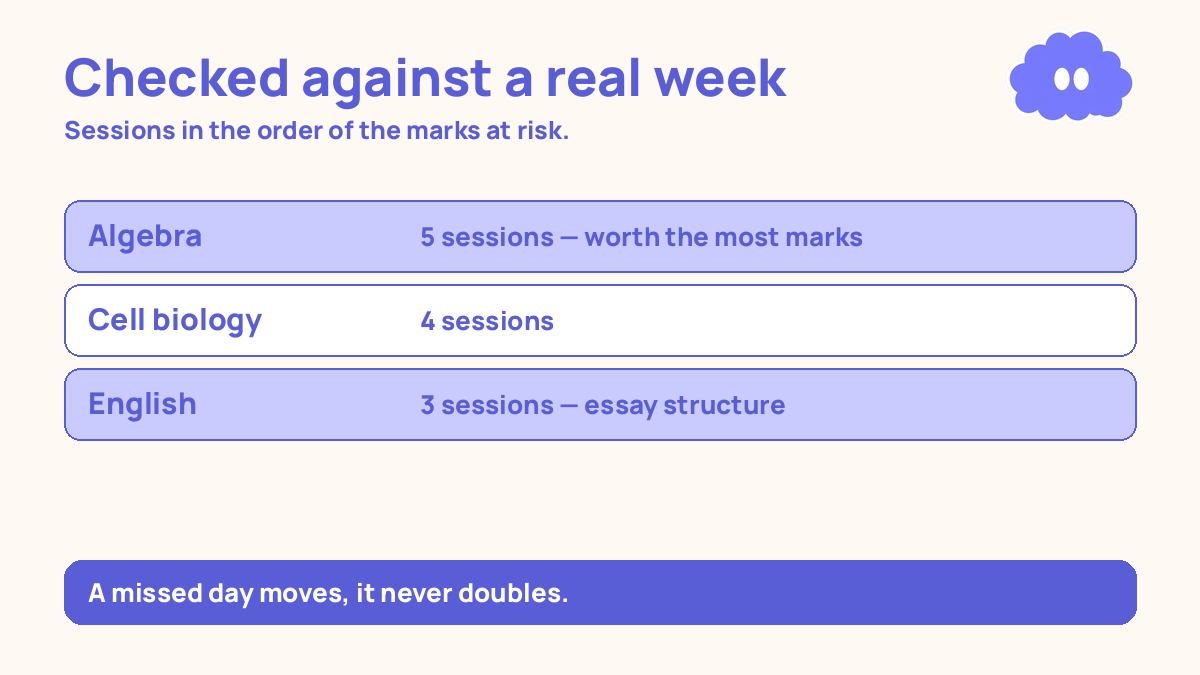
You have four exams. The first is in 28 days, the last in 35 days. Your weak topics, in order of marks at risk, are: algebra (worth the most marks), cell biology, and essay structure in English. Your honest free hours are two hours on weekdays and three hours on Saturday, with Sunday off for family.
You paste those lists into the AI app and ask for a timetable that tests each topic on day 1, day 3 and day 7, with the last week for re-testing only, in 25-minute sessions with 5-minute breaks.
The AI draft gives you three sessions a day, five days a week, with algebra first. It looks good — until you check it against your real week. It scheduled two hours on Wednesday, the evening you work a late shift and get home at 9pm. It scheduled a session on Sunday, your day off. And it gave essay structure the same number of sessions as algebra, even though algebra is worth far more marks.
So you fix it. You cut Wednesday to one 25-minute session, move the second session to Saturday, delete the Sunday sessions, and move one essay-structure session to algebra. You re-ask the AI for a revised draft with those changes, and the new draft fits.
The revised timetable looks like this for the first week. Each session is one 25-minute test, notes closed, with questions the AI wrote and you answered on paper.
| Day | Session 1 (25 min) | Session 2 (25 min) | Session 3 (25 min) |
|---|---|---|---|
| Monday | Algebra: test 10 questions | Cell biology: test 10 questions | — |
| Tuesday | Algebra: re-test the ones you got wrong | English: test essay structure | — |
| Wednesday | Algebra: test 10 new questions | — | — |
| Thursday | Cell biology: re-test (day 3) | Algebra: re-test (day 3) | — |
| Friday | English: test essay structure | Cell biology: test 10 new questions | — |
| Saturday | Algebra: re-test (day 7) | Cell biology: re-test (day 7) | English: re-test (day 7) |
| Sunday | Day off | — | — |
Count the week. Algebra gets five sessions, cell biology gets four, English gets three — in the same order as the marks at risk. Each topic is tested on day 1, again around day 3, and again around day 7. The last week of the timetable, days 22 to 28, has no new topics — only re-tests of the three weak topics, and one timed practice for each exam.
Now suppose you miss Thursday, because the shift runs late. You do not double up on Friday. On Friday you do Friday’s sessions, and you move Thursday’s algebra re-test to Saturday, where there is a spare slot after the day-7 tests. The timetable moves by one session, not by a day. The spacing is still roughly day 1, day 3, day 7 — a day late is still spacing, and a doubled day is not.
When it goes wrong
You paste a wish list, not a fact list. Four free hours a day, when you really have two. The timetable fails on day one, and you blame the AI. Go back to step 1 and write the honest hours. A timetable built on two real hours works. A timetable built on four imaginary ones does not.
You follow the first draft without checking it. The AI scheduled sessions on your day off, or at an hour you are always tired. You skip them, then skip the next ones too, and by Wednesday the timetable is dead. Read every draft against your real week before you follow it. The checking is the work.
You let the AI decide your hours. “Ask the AI how many hours I should study” is the wrong question. The AI does not know your shifts or your family. You know your hours. The AI’s job is to arrange the topics inside them, not to invent them.
You re-read instead of testing. The timetable says “algebra, 25 minutes”, and you spend the 25 minutes reading the algebra chapter again. Re-reading was rated low utility. Close the notes, answer ten questions from memory, then check. If you cannot answer them, that is the information — the topic needs another test, not another read.
You let the AI write the work. It writes your essay plan, your notes, your answers, and you read them back feeling ready. On exam day you have to produce it from memory, and reading is not producing. Use the AI to write test questions. Answer them yourself.
You miss a day and try to double up. Two days’ work in one day feels like catching up and works like cramming. Do the next session, move the missed one to a spare slot, and if there is no spare slot, cut the easiest topic.
You keep learning new topics in the last week. The last week is for re-testing only. A new topic in the last week takes time from the topics you have already tested three times, and it will not be learned in time. Re-test what you have, and stop.
Weekly review checklist
Copy this list and use it each week:
- Did I test each weak topic on the timetable’s days this week, notes closed, and did the scores rise from the first test to the re-test?
- Which sessions did I actually do, and which did I skip — and were the skipped ones at hours that do not exist in my real week?
- Did the AI draft still fit my real week, or does it need a revised draft with my corrected hours?
- Did I ask the AI to write test questions, and answer them myself — or did I let it write the work for me?
- What one change will I make next week: a different session time, a topic moved up the order, or a missed session moved to a spare slot instead of doubled?
Downloadable infographic spec: one vertical image, title “Use AI to build a revision timetable”, with the five steps — list your exam dates, weak topics and honest hours; ask AI to draft the timetable; check it against your real week; test yourself, do not re-read; move it when a day is missed, never double up — and the rule “AI drafts, you decide” in Thynq cream, Cloud Purple, Dark Purple and pink, with the cloud mascot. Text taken word-for-word from this article.
What this system is not
It is not a promise that you will pass, and it is not a claim that AI can study for you. No timetable, AI-built or hand-built, can make up for hours you do not have, and no AI app can learn a topic on your behalf. This system is a way to turn a list of exam dates, weak topics and honest hours into a timetable in minutes, check that timetable against your real life, and then spend the hours you actually have testing yourself instead of re-reading — and to move the timetable when life gets in the way, instead of abandoning it.
Sources
- Cepeda, N. J., et al. (2006). Psychological Bulletin, 132(3), 354-380. Spaced practice beat massed practice across materials, ages and retention intervals, and the right gap grows with how long you need to remember the material.
- Cepeda, N. J., et al. (2008). Psychological Review, 115(4), 1095-1125. 1,354 people learned facts, reviewed after a gap, and were tested up to a year later. At any test delay, a longer gap first helped, then hurt — an inverted U. The best gap grew as the test delay grew: about 20–40% of a one-week delay, down to about 5–10% of a one-year delay.
- Dunlosky, J., et al. (2013). Psychological Science in the Public Interest, 14(1), 4-58. Only practice testing and distributed practice rated high utility; rereading rated low.
- Gollwitzer, P. M. & Sheeran, P. (2006). Advances in Experimental Social Psychology, 38, 69-119. Across 94 studies, if-then plans raised goal attainment (d = 0.65).
Questions
Can AI build a revision timetable for me?
Yes, if you give it the right inputs: your exam dates, your weak topics in order of marks at risk, and your honest free hours per day. It will draft a timetable that spaces each topic over the weeks you have. But it does not know your real week, so check every session against your shifts, family duties and energy before you follow it.
How should I ask AI to space my revision?
Ask it to test each topic on day 1, again in 3 days, and again in 7 days, and to leave the last week for re-testing only. That 1-3-7 pattern is a practical starting schedule, not a research rule — the research says spacing beats massing, and the right gap grows with how long you need to remember the material.
What if the AI timetable does not fit my real week?
Fix it yourself before you follow it. Move the sessions that clash, cut the hours you do not actually have, and re-ask the AI for a revised draft if you want one. AI cannot decide your real hours for you. A timetable that ignores your shifts and family duties is a timetable you will abandon by Wednesday.
Should I let AI write my notes or answers?
No. AI is for drafting the timetable, spacing your topics, and suggesting an order — not for doing the learning. Ask it to write test questions for you, then close the app and answer them from memory. Re-reading was rated low utility, and practice testing was rated high, in a 2013 review by Dunlosky and colleagues.