The direct answer
Study with the apps already on your phone: audit what is on it, keep three apps that do study work — a timer, a notes app, and an AI chat app — move everything else off the home screen for one week, and put the phone in another room during study blocks. That is the whole system.
You do not need a new study app. Your phone already has a timer, a notes app, a recorder, a camera, and probably an AI chat app, and those cover almost everything a study system needs: timing blocks, writing questions, recording explanations, and testing yourself. The problem is the twenty other apps sitting next to them on the same screen, each one a tap away. Every switch costs time, and the cost grows with how complex the task is (Rubinstein, Meyer & Evans, 2001).
One study found that a phone on the desk cost focus even when it was off or face down, and that most people in the study said the phone’s location had not affected them — they were wrong about that (Ward et al., 2017). But a later pre-registered replication did not find the effect at all (Ruiz Pardo & Minda, 2022). So the evidence is mixed, and this article treats “phone in another room” as a practical system, not as a proven fact.
This system is different from the phone setup for focus, which is about silencing notifications. This one is about the apps themselves: which ones earn a place on the home screen, and how you decide what comes back. It fits inside how to build a daily study habit: a daily habit takes weeks to feel automatic, a median of 66 days in one study, and one missed day does not reset it (Lally et al., 2010).
The system in short
- Count what is on your phone: every app on the home screen, and how many times you pick the phone up in one study day.
- Keep three apps on the home screen: a timer, a notes app, and an AI chat app.
- Move everything else off the home screen into one folder, and turn off its notifications.
- Put the phone in another room during study blocks, with one if-then plan for starting each block.
- After one week, count again, and let back only the apps you opened three days in a row for a real job.
Step 1: Count what is on your phone
Do not change anything on the first day. Count first, because without a starting count you cannot tell whether the week worked.
Count the apps on your home screen — the ones one tap away, not every app installed. Write the number down. Then count the apps you actually opened for study in the last three days. Most students find the two lists barely overlap: twenty apps on the screen, two or three used for study.
Then count the pickups. For one study day, put a tick on paper every time you pick the phone up during a study block. A tick for checking the time counts. A tick for opening an app you do not remember opening counts too — that one is the most useful tick, because the switch happened before you decided to switch.
Write the two numbers down: apps on the home screen, and pickups in one study day. Those are the numbers the week has to move.
Step 2: Keep three apps, and only three
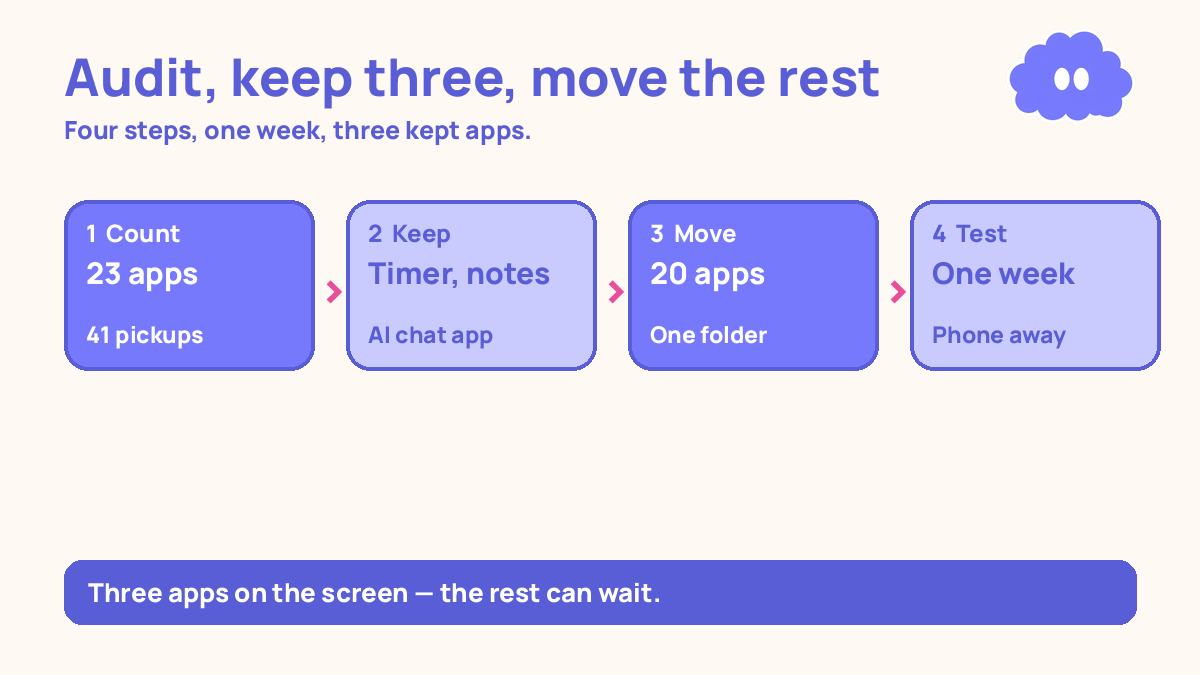
Keep three apps on the home screen: a timer, a notes app, and an AI chat app. Everything else moves in step 3.
The timer runs your study blocks. The one already on your phone is fine. A 25-minute block with a 5-minute break is a practical starting point, not a research rule — the 25-minute length was the Pomodoro Technique’s practical choice, not a number from cognitive science — and a 50-minute block with a 10-minute break works better for longer tasks.
The notes app holds your questions and your one-page summaries. It is the app you open when a question comes up while you study, and the app you search when you cannot remember where you wrote something down.
The AI chat app tests you and explains what is stuck. It asks you questions from your notes and checks your answers. It does not write your work, and you do not trust its answers without checking them against your notes.
Why three, and not five or ten? Because three is a list you can remember, and every app on the home screen is a choice you make every time you unlock the phone. If the app you need for a real job is not one of the three, it lives in the folder in step 3, one extra tap away — and that one extra tap is the test. If you need it three days in a row, it earns its place back.
Step 3: Move everything else away for one week
Move every other app off the home screen into a single folder called “Later”. Do not delete anything. Deleting an app you need again costs time; moving it adds one step between you and opening it, and one step is usually enough to catch the switch before it happens.
Turn off notifications for everything in the folder. Notifications are the phone switching for you: a buzz, a badge, a preview line, and you have switched tasks without deciding to. The three kept apps keep their notifications off too, unless a reminder is the only way a study block starts.
Step 4: Put the phone in another room during study blocks
During a study block, the phone goes in another room — not face down on the desk, not in your pocket. The evidence on whether a phone on the desk costs focus is mixed, so treat this as a practical rule and test it with your own count: if the pickups drop, keep the rule.
Write one if-then plan for starting each block: “If I sit down after lunch, then I will put the phone in the kitchen, set the timer for 25 minutes, and open my notes.” An if-then plan names the cue and the action in advance, so starting does not need a fresh decision every time. Across 94 studies, if-then plans raised goal attainment by a medium-to-large amount over holding the goal alone (Gollwitzer & Sheeran, 2006).
Step 5: After one week, count again and let back what earned it
After seven days, count the same two numbers from step 1. Then decide what comes back, by one rule only: an app comes back if you opened it from the folder three days in a row for a real job — a message you had to answer, a timetable you had to check, a family call.
An app you opened once, or opened and regretted, stays in the folder. An app you opened every day but never for a real job stays too. The folder is where apps live until they prove they do a job.
Keep counting pickups once a day for one more week. If they creep back up, the layout has crept back too, and the fix is the same ten minutes from step 3.
A worked example: 23 apps, one week, three kept
This is a worked example, with the article’s own numbers — not a real student, and not a promise of a grade.
You count on Monday. The home screen holds 23 apps. In one study day you pick the phone up 41 times during study blocks, and you finish 2 of the 4 blocks you planned.
Monday evening — the audit: You keep three apps: the timer, the notes app, and the AI chat app. The other 20 go into a folder called “Later”, notifications off. Ten minutes, done in one sitting.
Tuesday to Friday — the test: The phone goes in the kitchen during every block. The if-then plan is “If I sit down after lunch, then the phone goes in the kitchen, the timer runs 25 minutes, and my notes open.” Anything else goes on a paper list for after the block — and most of it no longer matters by then.
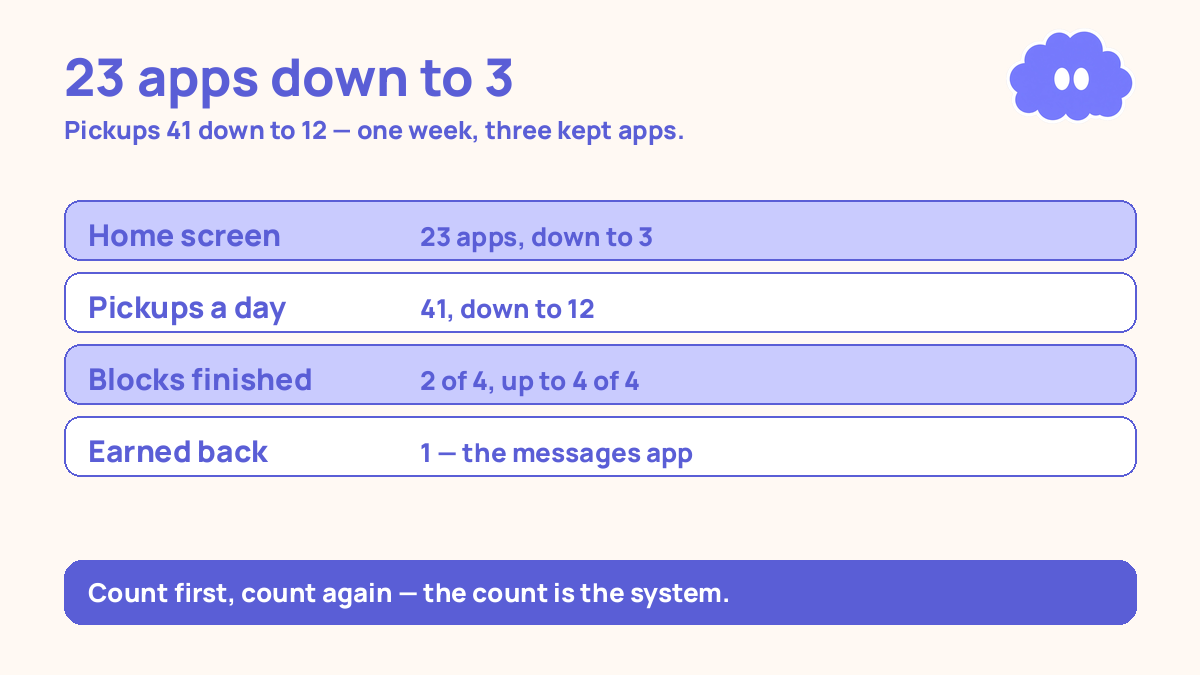
Saturday — the count: Home screen apps, 23 down to 3. Pickups in one study day, 41 down to 12, and 9 of those 12 are checking the time. Blocks finished, 2 of 4 up to 4 of 4. One app earns its place back: the messages app, opened from the folder four days in a row. The other 19 stay in the folder.
| What you counted | Before the audit | After one week |
|---|---|---|
| Apps on the home screen | 23 | 3, then 4 |
| Pickups in one study day | 41 | 12 |
| Study blocks finished | 2 of 4 | 4 of 4 |
| Apps that earned their place back | — | 1, the messages app |
When it goes wrong
You keep five or six apps “just in case”. Then every unlock is a choice again. Cut to three. If an app is really needed, the folder is one tap away, and three days in a row earns it back.
You delete apps instead of moving them. Deleting turns a one-week test into a chore: reinstalling, logging in again, losing saved things. Move, do not delete.
You keep the phone on the desk because the evidence is mixed. The evidence is mixed, so test it on yourself. One week with the phone in another room, counted pickups before and after. If your count does not move, bring the phone back and look for the real problem — usually the plan, not the phone.
You audit once and never count again. The apps creep back one at a time, and a month later the home screen is full again. Count pickups once a week, one day, one tick per pickup.
Weekly review checklist
Copy this list and use it each week:
- How many apps are on the home screen, and did any creep back without earning it?
- How many pickups did I count in one study day, and is the number falling?
- How many study blocks did I finish out of the ones I planned?
- What one change will I make next week: a different three apps, a stricter phone spot, or a better if-then plan?
What this system is not
It is not a claim that your phone is ruining your focus, and it is not a promise that three apps will fix your studying. The evidence on phones and focus is mixed, and this system says so. It is a one-week audit with a count at both ends: count what is on the phone, keep three apps that do study work, move the rest away, count again, and let back only what earned its place.
Sources
- Ward, A. F., et al. (2017). Journal of the Association for Consumer Research, 2(2). A phone in another room beat a phone on the desk on tests of memory and focus, even when the phone was off — but most participants said the phone’s location had not affected them.
- Ruiz Pardo, A. & Minda, J. P. (2022). A pre-registered direct replication that found no significant difference by phone proximity or power state. The evidence is mixed.
- Rubinstein, J. S., Meyer, D. E. & Evans, J. E. (2001). Journal of Experimental Psychology: Human Perception and Performance, 27(4), 763-797. Every switch between tasks costs time, and the cost grows with complexity.
- Gollwitzer, P. M. & Sheeran, P. (2006). Advances in Experimental Social Psychology, 38, 69-119. Across 94 studies, if-then plans raised goal attainment by a medium-to-large amount (d = 0.65).
- Lally, P., et al. (2010). European Journal of Social Psychology, 40(6), 998-1009. The median time for a behaviour to feel automatic was 66 days, range 18 to 254 days, and missing one day did not measurably hurt the process.
For the focus setup this audit sits inside, read phone setup for focus, and for the daily habit, read how to build a daily study habit.
Questions
Do I need to delete my apps to study?
No. Move them off the home screen for one week instead. Deleting an app you need again costs time; moving it away adds one small step between you and opening it, and that step is usually enough.
Which three apps should I keep on the home screen?
One timer, one notes app, and one AI chat app — the timer runs your blocks, the notes app holds your questions, and the AI chat app tests you. Everything else can live in a folder for a week.
What if I need an app I moved away?
Open it from the folder, use it for that one job, and close it. If you open the same moved app three days in a row for a real job, it earns its place back.
How do I know if the audit worked?
Count two things: how many study blocks you finished, and how many times you picked the phone up without a reason. If blocks went up and pickups went down, keep the layout. If nothing changed, the apps were not the problem — the plan was.