The direct answer
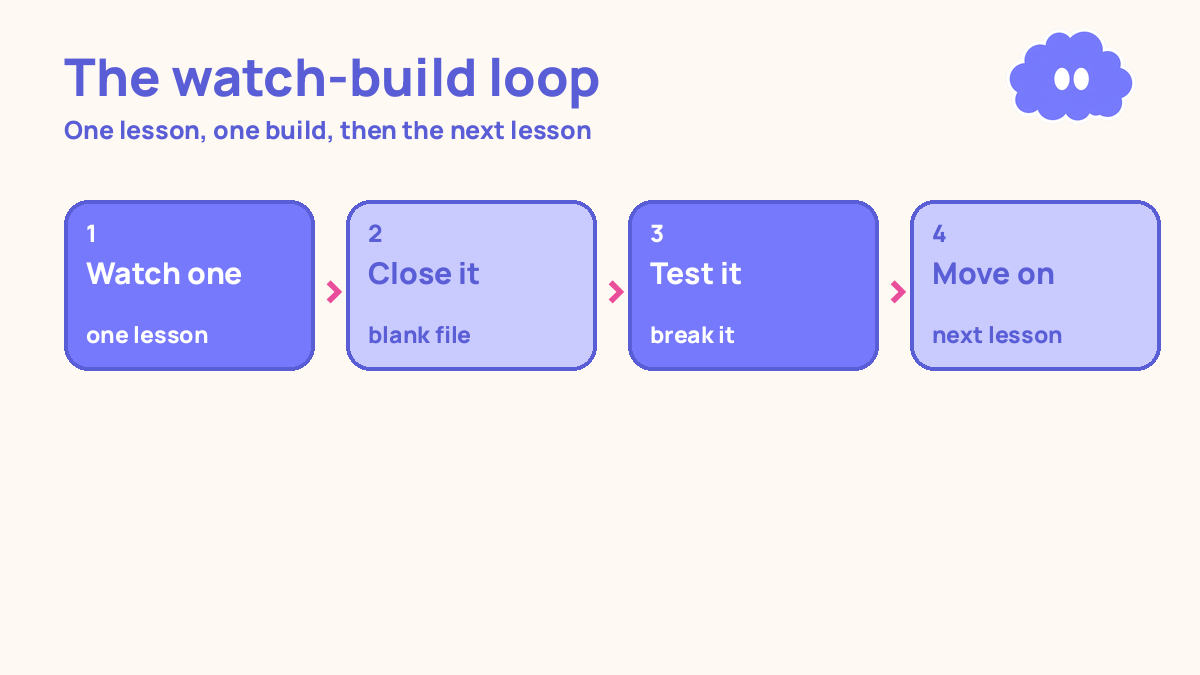
Watch one lesson, then build something small with what it taught, before you watch the next lesson. Never watch two lessons in a row without building in between. That one rule is the whole system: every lesson ends in something you made, not in the next video.
You have watched 30 tutorials. You have finished two courses. And when you sit down to build something on your own, the screen stays blank. You know the words — variables, functions, loops — but you cannot put them together without the video playing. So you watch another tutorial, and the loop starts again.
That loop has a name: tutorial hell. It is not laziness. It is a system with a missing step. Watching feels like learning, because the teacher makes it look easy and you follow along fine. But following along is not the same as doing it.
The system in short
- Pick one course and one lesson. Not three courses. One.
- Watch the lesson once, with a notebook open. Write down what it teaches, in your own words.
- Close the video. Build something small with only what that lesson taught. No peeking.
- When you get stuck, struggle for 10 minutes first, then check the lesson for that one point only.
- Test what you built. Break it on purpose, fix it, and write down what you learned.
- Only then watch the next lesson. Never two lessons in a row without a build in between.
The way out of tutorial hell is to learn by building, which is what How to learn to code online is built around.
Step 1: Pick one course and finish it
Tutorial hell starts with too many courses. You start one on Monday, another on Wednesday, a third on Saturday, and none of them ever gets past lesson five. Each new course feels like progress. It is not progress. It is restarting.
Pick one course. The one that matches what you actually want to build. If you want to build websites, pick the web course, not the data course and the app course as well. Put the others aside — not deleted, just aside.
Then decide what “done” means before you start. Done means you finished every lesson and built the course project, or done means you finished the first 20 lessons and built three small things of your own. Write it down. A course with no finish line is a course you drift through forever.
Step 2: Watch one lesson, once, with a notebook
Watch the lesson once, at normal speed, with a notebook open beside you. Do not watch it twice. Do not watch it at double speed while doing something else. One watch, full attention.
While you watch, write down what the lesson teaches, in your own words. Not a transcript — a short version. “A loop repeats a block of code until a condition changes.” “A function takes an input and returns an output.”
Write down one question the lesson leaves open, too. “When would I use this instead of that?” “What happens if the input is empty?” Questions are the bridge to the build: they tell you what to try when the video is closed.
Step 3: Close the video and build something small
This is the step that breaks the loop, and it is the step most students skip. Close the video. Close the lesson page. Open a blank file and build something small using only what that lesson taught.
Small means small. If the lesson taught loops, build a program that prints the numbers 1 to 10, then one that prints only the even ones. If it taught a web layout, build one page with a heading, a paragraph, and a button. If it taught a new formula or a new tool, use it on one real example of your own. The build does not need to be original or impressive. It needs to be yours, built without the video.
Set a timer for 30 minutes. That is enough for a small build, and short enough that you will actually start. If the build is not done in 30 minutes, it is too big — cut it in half and build the smaller half.
Getting stuck is part of the build, not a sign that you should go back to watching. When you get stuck, stay stuck for 10 minutes. Try something. Change one line and see what happens. Then, if you are still stuck, open the lesson — but only for the one point you are stuck on. Find it, understand it, close the lesson again.
Step 4: Test it, break it, fix it
A build you never test is a build you never learned from. Run what you built. Click the button. Enter the wrong input. See what happens when it breaks.
Then break it on purpose. Change a number and see what changes. Remove a line and see what fails. Put it back. This is how you find out what each part actually does, instead of just knowing that the whole thing worked once when the teacher typed it.
Write down two things when you are done: what the build taught you, and what is still unclear. One line each. “Loops: I can now repeat a task, but I still mix up when the loop stops.” That line is tomorrow’s starting point.
This is also where the research backs the system. In a 2011 study, 200 students studied science texts, then either re-read, built a concept map, or practised free recall. A week later, the retrieval group scored about 50% higher than the concept-mapping group (Karpicke & Blunt, 2011). The students who felt most confident were the ones who had done worst. Feeling fluent while watching is not the same as knowing it a week later. The build is the honest check.
Step 5: Move on only when the build works
Do not watch the next lesson until the build works — or until you have written down exactly where it fails and why. “Works” does not mean perfect. It means it runs, it does what the lesson taught, and you can explain what each part does in your own words.
If the build does not work after 30 minutes of trying, do not watch the next lesson to “come back to it later”. Later never comes. Instead, make the build smaller. Half the features, half the lines, one idea only.
When the build works, cross the lesson off your list. Physically cross it off, on paper.
A worked example: four weeks of a coding course
You are learning to code online, one hour a day, five days a week. The course has 20 lessons. Here is what the system looks like across four weeks — and how the balance shifts as you get better at building.
| Week | Tutorials watched | Small projects finished |
|---|---|---|
| Week 1 | 6 | 1 |
| Week 2 | 4 | 2 |
| Week 3 | 3 | 3 |
| Week 4 | 2 | 3 |
Week 1 is slow: six lessons, but only one finished build, because every build takes the full 30 minutes and you get stuck twice. Week 2 is better: four lessons, two builds. By week 3 you watch fewer lessons because each build teaches you more, and by week 4 you are spending most of your hour building, not watching. The total is 15 lessons and 9 small projects — and the 9 projects are the part that stays with you.
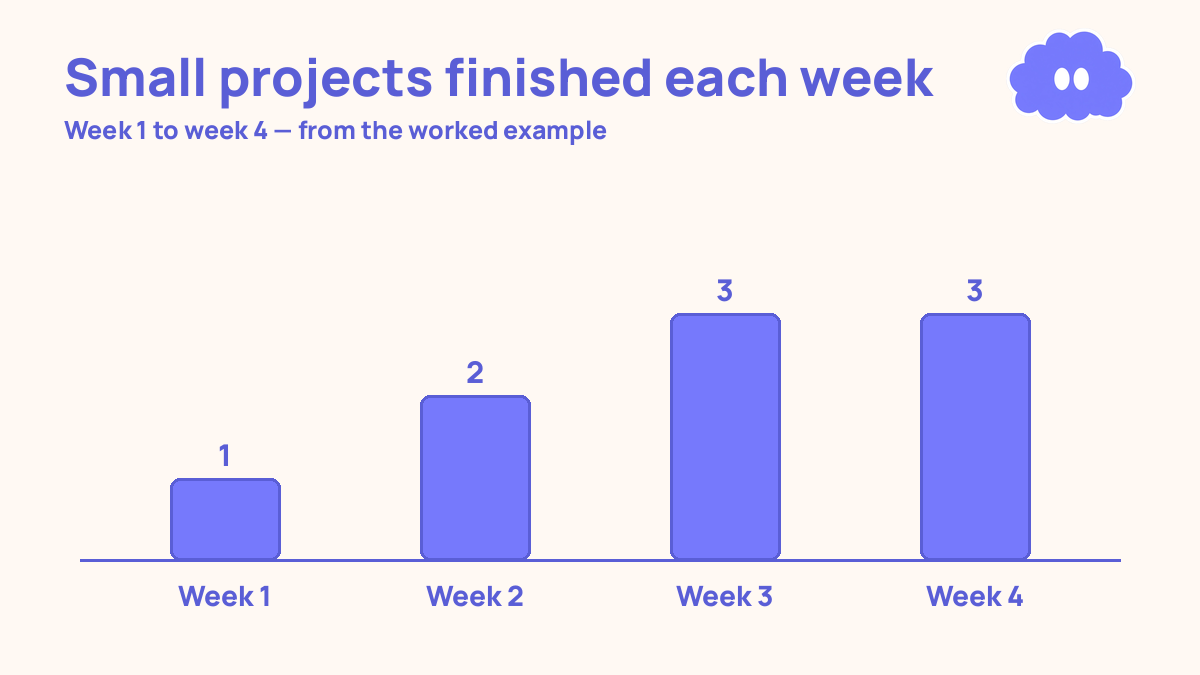
Notice what the table does not show: no week where you watched 10 lessons and built nothing. That week is tutorial hell, and the system is built to make it impossible. If a week ends with more lessons watched than things built, the next week starts with building, not watching.
For the wider system this sits inside, start with the self-study system for online learners, the full system for learning on your own with no teacher. If you keep starting courses and never finishing them, how to finish an online course is the system for getting to the end.
When it goes wrong
You watch the lesson and understand it, but the blank file defeats you. That is normal, and it is exactly the gap the system is for. Shrink the build until it is embarrassingly small: one line, one button, one number printed. Start there. A blank file beats you when the first step is too big. Make the first step tiny.
You get stuck and go straight back to the video.
You build the example exactly as the teacher did, and call it done. Copying the teacher’s example is not a build. It is typing. Change one thing: a different input, a different layout, a different example. The change is where the learning happens, because the change is the part the teacher did not do for you.
You finish the course and still cannot build alone. The course ended, but the system did not. Pick a small project of your own — one page, one tool, one thing you actually want — and build it using only what the course taught. No new tutorials until it works. The video feels like help, but re-watching the whole lesson is how the loop restarts.
Weekly review checklist
Copy this list and use it at the end of each week:
- How many lessons did I watch this week, and how many things did I build?
- Which builds are finished and working, and which are still broken?
- What did each build teach me, in one line each?
- Where did I get stuck this week, and what fixed it?
- What one change will I make next week: smaller builds, a stricter one-lesson rule, or fewer courses open at once?
Downloadable infographic spec: one vertical image, title “Escape tutorial hell”, with the loop watch one lesson, close the video, build something small, test it and break it, then watch the next lesson, and the rule “never two lessons in a row without a build”, in Thynq cream, Cloud Purple, Dark Purple and pink, with the cloud mascot. Text taken word-for-word from this article.
What this system is not
It is not a claim that tutorials are useless, and it is not a promise that building is fast. Tutorials are a good way to meet a new idea. They are a bad way to own it. This system does not ask you to stop watching.
Sources
- Karpicke, J. D. & Blunt, J. R. (2011). Retrieval practice produces more learning than elaborative studying with concept mapping. Science, 331(6018), 772–775. A week later, the retrieval group scored about 50% higher than the concept-mapping group, and the students who felt most confident had done worst.
- Bjork, R. A. (1994). Memory and metamemory considerations in the training of human beings. In Metcalfe & Shimamura (eds.), Metacognition: Knowing about knowing, MIT Press. Bjork, E. L. & Bjork, R. A. (2011). Making things hard on yourself, but in a good way. Conditions that make practice feel harder lower performance during practice and improve retention later — if the learner has the background knowledge to respond.
- Dunlosky, J., et al. (2013). Improving students’ learning with effective learning techniques. Psychological Science in the Public Interest, 14 (1), 4–58. Only practice testing and distributed practice received a high utility rating.
- Chi, M. T. H., et al. (1989). Self-explanations: how students study and use examples in learning to solve problems. Cognitive Science, 13(2), 145–182. Bisra, K., et al. (2018). Inducing self-explanation: a meta-analysis. Educational Psychology Review, 30(3), 703–725. Explaining why each step works, in your own words, produced a moderate average benefit.
Questions
What is tutorial hell?
Tutorial hell is the loop of watching one tutorial after another without ever building anything on your own. You feel busy and you feel like you are learning, but you cannot do anything without the video playing.
How many tutorials should I watch before I build something?
One. Watch one lesson, then build something small with what it taught before you watch the next one. Never watch two lessons in a row without building in between.
What should I build if I am a beginner?
Something tiny that uses only what the last lesson taught: one page, one function, one small change to an example. It does not need to be original or impressive. It needs to be yours, built without the video.
I have watched 40 tutorials and cannot build anything. Where do I start?
Stop watching. Pick the last lesson you half remember, close it, and rebuild its example from memory. Then change one thing in it. That first small build is the exit — the next lessons only count if a build follows them. Tutorial hell is the loop of watching one tutorial after another without ever building anything on your own.