The direct answer
Use your phone’s built-in focus mode to study: turn on Do Not Disturb before your first block, allow calls from family only, put the phone face down or in another room, do one task per block, and check the phone only in breaks, on a timer. The mode is already on your phone. It costs nothing, needs no account, and takes two minutes to set up.
Your phone is always in your hand. That is the problem, and it is also the solution. The same phone that interrupts you has a mode built into it that stops the interruptions. It is called Focus on an iPhone and Focus mode or Do Not Disturb on Android, and it has been there for years, unused. This system turns it on, and builds a study day around it.
The evidence for putting the phone away is mixed, and this article says so plainly. One study found a phone on the desk cost focus even when it was off — but a later pre-registered replication did not find the effect (Ward et al., 2017; Ruiz Pardo & Minda, 2022). So “phone in another room” is presented here as a practical system, not as a proven fact. Try it for a week and keep it if your blocks get longer. What is not mixed is the cost of switching: in four experiments, people lost time on every switch between tasks, and lost more as the tasks got more complex — mean switch costs of 614 to 1,096 milliseconds per switch (Rubinstein, Meyer & Evans, 2001). Every check of the phone is a switch, and every switch costs time, whether or not you notice it.
It fits with the phone setup for focus — that system is the full setup, and this one is the daily use of the mode itself. It also fits with how to stop doomscrolling before study, because the mode is the wall between you and the scroll.
The system in short
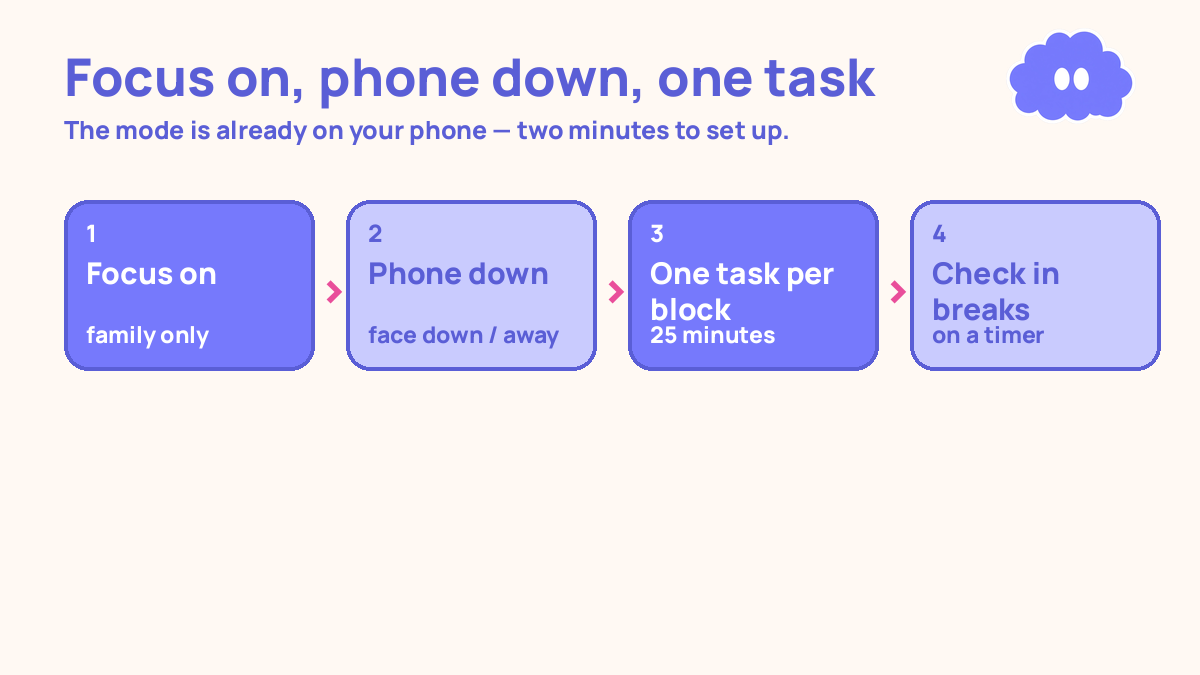
- Turn on focus mode before the first block, with calls from family allowed and everything else silent.
- Put the phone face down, or in another room, for the whole block.
- Do one task per block. When the timer ends, the block ends — not when you feel like stopping.
- Check the phone only in breaks, on a timer, and write down every time you open an app.
- In the evening, count the checks, and shrink the allow list for tomorrow.
Step 1: Turn focus mode on before the first block
Open Settings, find Focus or Do Not Disturb, and turn it on before you start studying — not during the first block, not after the first interruption. Before. On an iPhone it is in Settings under Focus, or in Control Centre. On Android it is in Settings under Digital Wellbeing, or in the quick settings. The names differ, but every modern phone has one, and you do not need to install anything.
First, set the allow list. Add the people who may need you urgently — usually family — and nothing else. Not your friends, not your group chats, not the delivery app. The point is to choose who can reach you, instead of letting every app decide for you. If nobody needs to reach you urgently, allow nobody. An empty allow list is a valid choice.
Then set the mode to turn off automatically when the block ends, if your phone offers that — a timer, or a schedule. If it does not, set a second timer for the end of the block, and turn the mode off then. The mode must end when the block ends, or it will stay on all day and you will stop trusting it.
Step 2: Put the phone down for the whole block
Focus mode silences the phone. Distance silences the habit. Put the phone face down on the desk, or on the other side of the room, or in another room entirely — whichever one you can actually stick to. If you pick it up every five minutes even with the mode on, the mode is not the problem. The distance is. Put it further away.
The evidence here is mixed, and this article does not hide that. In two experiments with nearly 800 smartphone users, people whose phone was in another room did better on tests of memory and focus than people whose phone was on the desk, even when the phone was off or face down — and most participants, about 76%, said the phone’s location had not affected them at all (Ward et al., 2017). But a pre-registered direct replication found no significant difference by phone proximity or power state (Ruiz Pardo & Minda, 2022). So treat “phone in another room” as a practical system to try for a week, not as a proven fact. If your blocks get longer, keep it. If they do not, the distance was never the problem — the checking was, and that is Step 4.
If you need the phone for the study itself — a timer, a voice note, a photo of a page — keep it face down and use it only for that one job. The timer is the job. The moment the timer is set, the phone goes face down again.
Step 3: One task per block
Set a timer for 25 minutes and do one task. One topic, one page, one set of questions. Not two topics, not a topic and a message, not a topic and a video. One task. The 25/5 pattern is a practical starting choice, not a number from science — Francesco Cirillo picked 25 minutes for his own kitchen timer in the late 1980s, and it became the Pomodoro Technique. Fifty-minute blocks with a ten-minute break work just as well for longer tasks.
Switching is the cost this step removes. In four experiments, people lost time on every switch between tasks, and lost more as the tasks got more complex or less familiar — mean switch costs of 614 to 1,096 milliseconds per switch (Rubinstein, Meyer & Evans, 2001). A fraction of a second per switch sounds small, but a study block has dozens of switches if you keep checking the phone, and the cost is paid every time, whether or not you notice it. That famous “40% of productive time” number is not in the paper — it is a remark attributed to one of the authors on a summary page — so this article does not repeat it. The paper’s own numbers are enough: every switch costs time, and the cost grows with complexity. Finish one task before starting the next, and batch the switches into the breaks.
When the timer ends, the block ends. Stand up, drink water, look away from the screen. Do not finish “just one more paragraph.” The timer decides, not your attention. After four blocks, take a longer break of twenty to thirty minutes.
Step 4: Check the phone only in breaks, on a timer
In the five-minute break, you may check the phone. On a timer, for the break only. Five minutes, then the phone goes face down again and the next block starts. If the break ends and you are still scrolling, the scroll has eaten the next block, and the next block is the one that matters.
Write down every time you open an app during a block. One line in your notes app: the time, and the app. “3.20pm, messages.” “3.47pm, video.” The list is not a punishment. It is data. Most students are surprised by the number, because a check feels like nothing and the list shows it was seven times. The list is the only honest record of the day, and it is what Step 5 works from.
If a message arrives during a block and you feel you must answer it, write the reply in your notes app and send it in the break. The reply takes five seconds to write and the break is when it gets sent. The block is not interrupted, and the message is not forgotten. Both jobs get done, in their own time.
Step 5: In the evening, count the checks and shrink the allow list
At the end of the day, count the lines in your check list. How many times did you open an app during a block? Which app, and at what time? If the same app appears three times, that app is the problem, and tomorrow it goes off the allow list — or off the home screen for the study day. If the checks cluster at one time of day, that time is the problem, and tomorrow the phone goes in another room for that hour.
Then set tomorrow’s first block before you sleep: “If I sit down after breakfast, then I will turn on focus mode and start the timer.” An if-then plan names the cue and the action in advance, so starting does not need a fresh decision every morning. Across 94 studies, if-then plans raised goal attainment by a medium-to-large amount over holding the goal alone (Gollwitzer & Sheeran, 2006).
Do not judge the system by one day. A daily study habit takes weeks to feel automatic — in one study the median time was 66 days, with a range of 18 to 254 days — and one missed day does not reset it (Lally et al., 2010). Judge it by the week’s count: fewer checks this week than last week is the system working, even if today was bad.
A worked example: one day, four blocks, seven checks
This is a worked example, with the article’s own numbers — not a real student, and not a promise of a grade.
You have a history test in two weeks. Today is a study day, four blocks after school, focus mode on, phone face down.
Block 1, 25 minutes: You turn on focus mode, allow list is family only. You read one page on the causes of the First World War. Timer ends. No checks. Break, 5 minutes: you check messages, reply to one, phone face down.
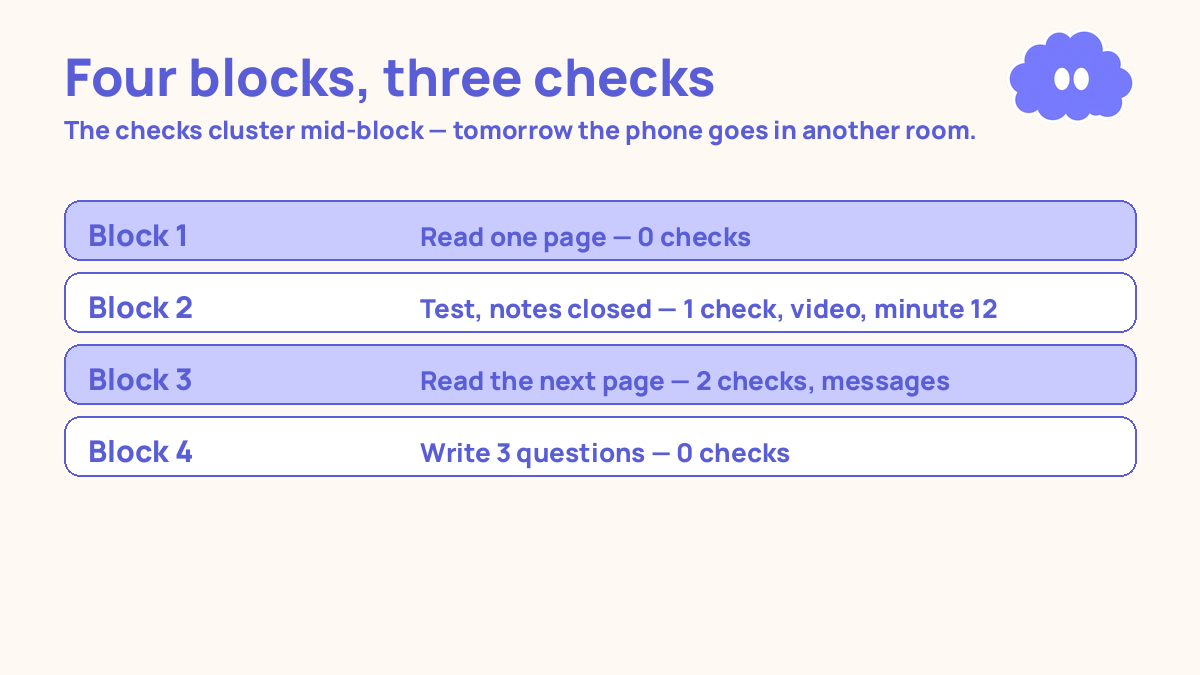
Block 2, 25 minutes: You test yourself on the page, notes closed. At minute 12 you pick up the phone and open a video app. You catch yourself, write it down — “4.12pm, video” — and go back to the questions. Timer ends. One check.
Block 3, 25 minutes: You read the next page. At minute 8 you check messages. At minute 19 you check them again. Two checks. Timer ends. Break, 5 minutes: you check the phone, on the timer, and put it down.
Block 4, 25 minutes: You write three questions from the day’s gaps. No checks. Timer ends. You photograph the page you stopped on and write tomorrow’s if-then plan.
Evening review: Four blocks finished, three checks during blocks — one video, two messages, all in blocks 2 and 3. The pattern is clear: the checks happen in the middle of the block, not at the start. Tomorrow, the phone goes in another room for blocks 2 and 3, and the video app comes off the home screen for the study day.
| Block | The work | Checks during the block | The fix |
|---|---|---|---|
| Block 1 | Read one page: causes of WWI | 0 | None needed |
| Block 2 | Test, notes closed | 1 — video, minute 12 | Phone in another room tomorrow |
| Block 3 | Read the next page | 2 — messages, minutes 8 and 19 | Video app off home screen |
| Block 4 | Write 3 questions, photo, plan | 0 | None needed |
When it goes wrong
You turn focus mode on and still pick up the phone. The mode did its job and the habit did not. Put the phone in another room for the block, or face down on the other side of the desk. Focus mode silences the phone; distance silences the habit. Use both until the habit holds on its own.
You allow too many people and apps through. If the allow list has ten names and five apps, it is not an allow list, it is a normal day. Cut it to family only, or to nobody. You can add people back one at a time, when the system is working.
You check the phone in the break and do not come back. The break is five minutes, on a timer. When the timer ends, the phone goes face down and the next block starts. If the scroll eats the block, the scroll is the system now, and the study is the interruption. Set the break timer, and obey it the same way you obey the block timer.
You count the checks and feel bad about the number. The number is not a grade. It is data. Seven checks on day one and four checks on day seven is the system working. Zero checks on day one usually means you did not write them down. Write them all down, every time, and let the week show the trend.
You use focus mode all day, every day. Then it stops being a study mode and becomes a wall. Turn it off between study sessions. The mode is for blocks. Outside blocks, the phone is a phone.
Weekly review checklist
Copy this list and use it each week:
- How many blocks did I finish this week, and how many were lost to checks?
- Which app did I open most during blocks, and did I take it off the allow list?
- Did the checks get fewer this week than last week, or did they stay the same?
- What one change will I make next week: phone in another room, a shorter allow list, or a stricter break timer?
Downloadable infographic spec: one vertical image, title “Use your phone’s built-in focus mode to study”, with the five steps — focus on, phone down, one task per block, check in breaks only, count the checks — and the rule “focus mode silences the phone; distance silences the habit” in Thynq cream, Cloud Purple, Dark Purple and pink, with the cloud mascot. Text taken word-for-word from this article.
What this system is not
It is not a claim that putting your phone in another room is proven to help — the evidence on that is mixed, and this article says so. It is a way to use the focus mode already on your phone, to do one task per block, to count the times you break the rule, and to make the next day a little harder to break. The system does not make you focused. It makes the interruptions visible, and the visible ones are the ones you can fix.
Sources
- Ward, A. F., et al. (2017). Journal of the Association for Consumer Research, 2(2). A phone on the desk cost focus even when off — but see the replication below.
- Ruiz Pardo, A. & Minda, J. P. (2022). Pre-registered direct replication of Ward et al. (2017); found no significant difference by phone proximity or power state.
- Rubinstein, J. S., Meyer, D. E. & Evans, J. E. (2001). Journal of Experimental Psychology: Human Perception and Performance, 27(4), 763-797. Mean switch costs of 614 to 1,096 milliseconds per switch; the “40% of productive time” figure is not in the paper.
- Gollwitzer, P. M. & Sheeran, P. (2006). Advances in Experimental Social Psychology, 38, 69-119. Across 94 studies, if-then plans raised goal attainment by a medium-to-large amount.
- Lally, P., et al. (2010). European Journal of Social Psychology, 40(6), 998-1009. Median time for a behaviour to feel automatic was 66 days, range 18 to 254; one missed day did not reset it.
For the full setup this fits with, read phone setup for focus, and for the scrolling this stops, read how to stop doomscrolling before study.
Questions
Where is focus mode on my phone?
On an iPhone, it is in Settings under Focus, or in Control Centre — tap Focus, then Do Not Disturb. On Android, it is in Settings under Digital Wellbeing, or in the quick settings as Focus mode or Do Not Disturb. The names differ, but every modern phone has one. You do not need to install anything.
Will focus mode block an important call?
No, if you set it up right. Before your first block, add the people who may need you urgently — usually family — to the allowed list. Everything else stays silent until the block ends. The point is to choose who can reach you, instead of letting every app decide for you.
What if I turn focus mode on and still pick up the phone?
Then the mode did its job and the habit did not. Put the phone in another room for the block, or face down on the other side of the desk. Focus mode silences the phone; distance silences the habit. Use both until the habit holds on its own.
How long should a focus block be?
Twenty-five minutes of work and a five-minute break is a practical starting point — it was the personal choice of Francesco Cirillo, who invented the Pomodoro Technique in the late 1980s, not a number from cognitive science. Fifty-minute blocks with a ten-minute break work just as well for longer tasks.